

What if the best first workload to move isn’t the one that seems easiest? A successful migration starts with business priorities, not a race to transfer systems. It’s understandable to worry about staff losing access, unexpected costs or hidden dependencies. Good cloud migration planning brings those concerns into the open before work begins.
This guide shows you how to build a practical plan that connects your goals to the workloads that make sense to move, retain or address later. You’ll learn how to define success, assess applications and dependencies, and set a sensible sequence that supports continuity for your team.
We’ll also cover costs, staff adoption, security, backup and support after migration. Moving to the cloud is part of a wider technology plan, so the work doesn’t end when a workload is transferred. With consulting, implementation and ongoing IT support working together, your business can make informed decisions and keep improving its cloud environment over time.
Key Takeaways
- Build your workload inventory around ownership, users and business importance, then map connections that could affect migration order.
- Use cloud migration planning to decide which systems to rehost, adapt, replace, retain or retire, based on their role and requirements.
- Set phases and decision points that account for dependencies, business calendars and the people available to carry out the work.
- Give named owners responsibility for decisions, staff communications, testing and day-to-day operations after each move.
- Connect migration work with hosting, collaboration, backup and ongoing IT support as part of a wider technology plan.
What cloud migration planning means for your business
Cloud migration planning is the process of deciding what should move to a cloud environment, why it should move, when to make the change and how you’ll judge whether it has worked. Start with your organisation’s day-to-day needs, not a particular provider or technical label. For a small team, that might mean making shared files easier to access away from the office. For a growing business, it could mean updating older systems that are becoming harder to support.
Cloud computing describes the wider model of accessing computing services over the internet. Migration planning turns that broad idea into decisions about your own systems and people. It sets the scope, records assumptions and identifies risks to address. Implementation is the practical work of configuring services, transferring data, testing systems and supporting users. Keeping planning and implementation distinct helps prevent technical work from starting before the business has agreed what it needs.
A plan doesn’t have to move every system at once. Some workloads may be suitable to move early, while others need more assessment or should remain where they are. A business might begin with email or file storage, for example, while keeping a specialist application in its current environment until its dependencies are understood. This staged approach lets decisions reflect operational importance and readiness, rather than treating migration as an all-or-nothing project.
What should a cloud migration plan achieve?
Begin with a clear outcome. “Move our systems to the cloud” describes an activity, but not what the business wants to improve. Set objectives you can review later, such as making remote access simpler, reducing reliance on ageing equipment or creating a more manageable working environment. Then identify who can approve the scope, which teams will be affected and who will own communications, testing and operational decisions.
Useful questions include:
- Which everyday task should become easier or more reliable?
- How will staff know what is changing and where to get help?
- What would show that the change has met its purpose?
Which systems and data might be in scope?
List the systems under consideration separately from those that may stay in place. Typical candidates include email, file storage, business applications, servers and the data that supports them. For each, note its users, business purpose and operational importance. Then map connections: an application may rely on a server, shared files or data used by another team. These links can determine a safe sequence and show where extra testing or staff guidance will be needed.
These early choices form the foundation for cloud migration planning. A clear business brief gives later workload assessments a practical test: does this move support an agreed need, and can the organisation manage the change?
Assess workloads and dependencies before choosing a migration route
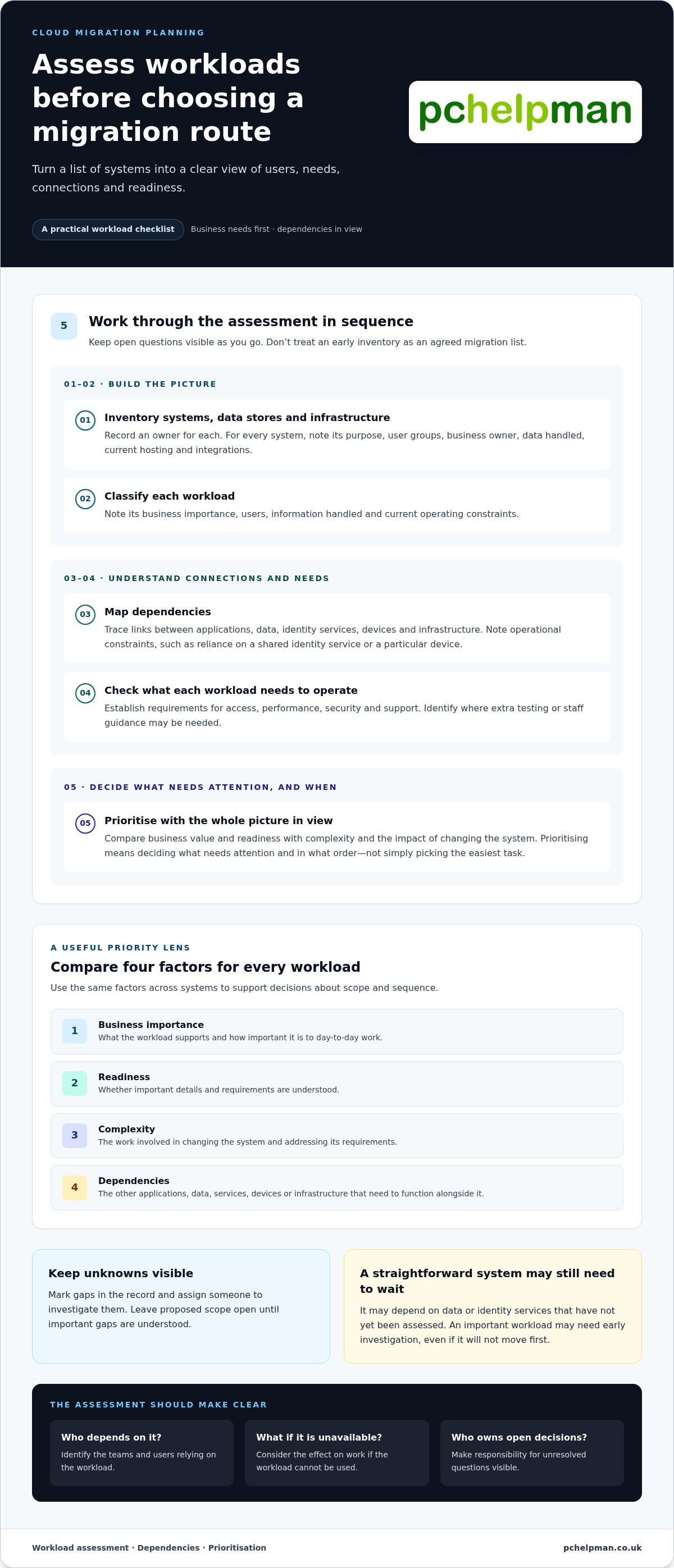
A useful assessment turns a list of systems into a picture of how work gets done. For each workload, record who relies on it, what it supports and what else needs to function alongside it. This gives decision-makers a practical basis for setting scope and sequence, rather than choosing a route based only on technical convenience.
Use a consistent sequence, and keep open questions visible as you go:
- Inventory: list systems, data stores and infrastructure, with an owner for each.
- Classify: note business importance, users, information handled and current operating constraints.
- Map dependencies: trace links between applications, data, identity services, devices and infrastructure.
- Check requirements: establish what each workload needs to operate, including access, performance, security and support.
- Prioritise: compare business value and readiness with complexity and the impact of changing the system.
The MITRE Cloud Migration Planning Guide provides further planning context. Apply each finding to your organisation: which teams depend on the workload, what would happen if it were unavailable, and who owns the decisions that remain open?
How to build a useful workload inventory
For every system, record its purpose, user groups, business owner, data handled, current hosting and integrations. Add operational constraints, such as a connection to a shared identity service or a process that relies on a particular device. Don’t assume a system is ready to move just because it appears straightforward. Mark unknowns, assign someone to investigate them and leave the proposed scope open until important gaps are understood.
Keep the record useful, not complicated. A spreadsheet may be enough for a smaller organisation. The important thing is that staff can update it and decision-makers can see which details are confirmed. Separate workloads being considered from those that will remain in place for now. This prevents an early inventory from being mistaken for an agreed migration list.
How to prioritise workloads using business dependencies
Compare workloads across four practical factors: business importance, readiness, complexity and dependencies. A straightforward application might still be a poor first move if it depends on data or identity services that haven’t been assessed. Conversely, a more important system may need early investigation, even if it won’t be moved first. Prioritising means deciding what needs attention and in what order, not simply picking the easiest task.
Dependency mapping turns a collection of systems into a migration order that reflects how your business operates. For example, if a team’s application depends on shared records and central sign-in, moving it before those connections are ready could create access or testing issues. Record the links, identify who understands them and use that information to shape the next planning decisions. Cloud migration consulting can help connect technical choices with business needs.
Compare cloud migration strategies, models and trade-offs
Once you understand what a workload does and what it depends on, consider how to handle it. The right approach may vary across systems in the same organisation. A standard office application might need only a straightforward move, while a heavily customised business system could need more substantial changes. Cloud migration planning should account for the effort involved and the work needed to manage each system afterwards.
How the main migration approaches differ
These are choices, not a scorecard. Retaining a system can be sensible if its dependencies aren’t ready, while retiring one can remove unnecessary work if it no longer serves a business need. Neither is a failed migration. An organisation may also replace an application with a cloud-based service, changing how users access it and how it is managed. For every route, consider the application changes, testing, staff support and continuing responsibilities involved.
Which cloud model fits your operating needs?
A public cloud uses services provided over shared infrastructure, whilst a private cloud is dedicated to one organisation. A hybrid model combines cloud services with systems kept in another environment, such as existing on-site infrastructure. Multicloud uses services from more than one cloud provider. These models aren’t interchangeable: each can affect control, connections between systems and the skills needed to operate the setup.
For example, a business may use cloud services for collaboration whilst retaining an established application on existing infrastructure. Another may use multiple providers because different workloads have different needs. Consider access, dependencies, oversight and your team’s capacity to manage the chosen arrangement. Don’t assume that moving to the cloud automatically reduces costs or removes operational responsibilities. Data transfer, support, security, monitoring and user administration still need attention. Compare the complete operating requirements with the business outcome you want, then choose a route for each workload rather than adopting one approach by default.
Build a cloud migration plan around timing, people and success measures
A workable schedule needs to reflect how your business operates, not just how quickly a technical task could be completed. Consider dependencies, staff availability, busy periods and the time needed to test each change. In cloud migration planning, clear phases and decision points help teams understand what happens next and when work should pause for review.
How to organise phases, responsibilities and communication
Group work into manageable phases, each with a defined scope, accountable owner and approval point. A phase might cover one service or a connected set of workloads. Set dates only after considering the people and preparation each phase needs. If a key team is unavailable during a busy period, adjust the schedule rather than squeezing testing or staff preparation.
Make responsibilities explicit. Name who approves changes, coordinates technical work, informs affected staff, tests the new setup and takes responsibility for ongoing operations. Staff communications should explain what is changing, when it will happen, what people need to do and where to get help. If a new tool or working method is involved, plan time for guidance before people depend on it.
A simple phase record can keep everyone aligned:
- Scope: the services, teams and tasks included.
- Readiness: the dependencies and preparations that must be in place.
- People: the decision-makers, delivery owners and staff affected.
- Approval: who reviews the results and agrees the next step.
How to validate the plan before implementation
Agree how each workload will be checked before work begins. Testing should reflect real tasks, not just whether a system starts. Ask the teams who use it to confirm that they can sign in, find the right data, use connected applications and complete essential workflows. Set acceptance criteria in plain language, and name the people responsible for reviewing the results.
For example, a file service might need checks for staff access, expected folders, permissions and links used by a business application. Record test outcomes and unresolved issues. A named decision-maker should decide whether the workload meets its criteria, needs further work or should wait. Include a review point before the next connected workload moves, so an issue in one phase doesn’t become a problem in another.
Readiness also depends on the arrangements around the technology. Make sure backup and recovery plans account for the systems being changed, and that security responsibilities are understood before, during and after migration. These are practical parts of continuity planning, not a substitute for separate, detailed risk reviews.
PcHelpMan® supports businesses with migration consulting and implementation, alongside relevant backup, continuity and ongoing managed IT support. Cloud migration consulting and implementation can bring the schedule, staff needs and operational support together in a practical approach.
Put cloud migration planning into practice with PcHelpMan®
A plan becomes useful when it guides practical decisions: what to configure, what to move first, how staff will access the new setup and who will support it afterwards. PcHelpMan® provides cloud migration consulting and implementation to help businesses turn agreed priorities into manageable work. The focus is on fitting technology choices to the organisation, rather than treating migration as a transfer in isolation.
How tailored migration support can fit your business
Planning starts with your systems, working arrangements and business priorities. Understanding how applications connect, who uses them and what teams need helps shape an implementation approach around real operational needs. Staff access and communication are part of that work, as are testing and the support people may need as tools or routines change. The sequence and scope can be tailored to each organisation’s requirements.
Cloud changes can also affect connected services. Hosting configuration, remote collaboration, backup and business continuity arrangements may need consideration alongside the workloads being moved. After implementation, managed IT support can help with ongoing maintenance and monitoring, as well as practical assistance for users. Bringing these areas into the same conversation keeps migration connected to the wider technology environment.
PcHelpMan® supports businesses across Brighton & Hove and surrounding areas. Whether your plan involves selected services or a broader change, the aim is to make decisions and responsibilities clear while accounting for continuity. No two organisations have identical systems or working patterns, so the approach should reflect your setup and priorities.
What to prepare for an initial migration discussion
You don’t need a finished technical blueprint to begin. A high-level picture is enough to make the conversation useful. Bring a list of the systems your organisation uses, the teams or user groups that rely on them, and a brief description of how work is currently carried out. Note known links between applications, shared data or sign-in arrangements, along with areas where information is still unclear.
It also helps to identify the outcomes you want. You might be looking to support remote collaboration, change how services are hosted or make ongoing IT management more straightforward. Include practical considerations such as important business periods, staff training needs and who will approve decisions. These details help shape cloud migration planning around what the organisation needs, not assumptions about what should move.
When you’re ready, discuss cloud migration planning with PcHelpMan®. A clear first conversation can help turn priorities, dependencies and support needs into considered next steps.
Make your next cloud decision with confidence
Your next step doesn’t need to be a complete technical blueprint. Start with the change your organisation wants to make, the people it needs to support and the questions that still need answers. A focused conversation can help turn those priorities into a practical direction for your cloud migration planning.
PcHelpMan® brings more than 25 years of experience to cloud migration consulting and implementation, with managed IT support available to help businesses plan for ongoing needs. Serving Brighton & Hove and surrounding areas, the team can consider how a cloud change fits into your wider working environment.
Share your objectives, current setup and concerns about access or continuity. Discuss your cloud migration plans with PcHelpMan® and take a considered next step at a pace that suits your organisation.
Frequently Asked Questions
What is cloud migration planning?
Cloud migration planning is the preparation that helps an organisation make informed decisions before changing where or how its IT systems run. It records intended outcomes, systems in scope, key constraints and the measures decision-makers will use to judge the change. A useful plan also states what is deliberately out of scope, so teams don’t treat every existing system as an automatic candidate.
How do you create a cloud migration plan?
Start by writing a short business brief that explains the reason for the change and the outcome you want. Add an inventory of systems, owners and users, then record dependencies, constraints and open questions. Decide who approves changes and who will coordinate staff updates and testing. Finally, document the proposed sequence, decision points and success measures. Keep the brief current as new information emerges, rather than treating the first version as fixed.
What are the main cloud migration strategies?
Common strategies include rehosting a workload with few changes, replatforming it with targeted adjustments, or refactoring it through more substantial redesign. Repurchasing replaces an existing application with a different service. Retaining keeps a workload where it is, while retiring removes one no longer needed. These options are often called the “6 Rs”. A strategy can differ by application, and the same organisation may use several approaches across its systems.
Should a business move everything to the cloud at once?
Usually, it’s more manageable to move in stages, especially if systems depend on shared data, sign-in services or staff workflows. A small, well-understood workload can be used to practise the process, but it should still be representative enough to test access and support arrangements. Moving everything together may suit a tightly connected environment, but it concentrates change. Agree in advance what would prompt a pause or a return to the previous setup.
How long does cloud migration planning take?
There’s no standard planning duration. A small project with a clear system inventory and few dependencies may be scoped more quickly than one involving older applications, unclear ownership or several teams. Time is also needed for decisions, testing arrangements and staff input. Rather than selecting a date first, identify the information still missing and who will gather it. That gives you a more realistic basis for setting a schedule.
Can cloud migration reduce IT costs?
It can, but savings aren’t automatic. Compare the full operating picture before and after, including existing infrastructure, cloud usage, software licences, data transfers, staff training and any period when both environments must run. Track actual usage after a move and review whether services are sized appropriately for the work they support. Also consider the staff time needed to manage the new setup. The goal is a suitable business outcome, not simply a lower headline bill.
What should a business assess before migrating to the cloud?
Alongside system purpose and dependencies, check the condition and importance of the data, who can access it, and whether the current records are accurate enough to move. Review application compatibility, licence terms, network capacity and any processes that rely on local equipment. Confirm that backups can be restored, not just that they exist. These checks can reveal practical work to complete before scheduling a migration, such as tidying access or resolving data issues.
Does a business need support after cloud migration?
Often, yes. Teams may need help adjusting to new ways of working, while administrators still need to manage access, monitor systems, review backups and resolve technical issues. Ongoing support can also help identify changes as the organisation’s needs develop. PcHelpMan® provides managed IT support for businesses in Brighton & Hove and surrounding areas, including helpdesk support and ongoing maintenance. Agreeing responsibilities before migration makes it clearer who will look after the environment afterwards.
