

How can you move business systems to the cloud without losing data or bringing everyday work to a halt? The answer isn’t to transfer everything at once. Moving business systems to the cloud is easier to manage when you plan the change in stages and choose an approach that fits each workload.
It’s reasonable to be concerned about downtime, data loss and the effect a migration could have on your team. Comparing cloud service models and deciding which systems to move first can also be challenging. A clear plan helps you make those decisions before the transition begins, rather than trying to solve problems mid-move.
This guide sets out a practical sequence, from assessing your systems and choosing a suitable cloud approach to testing the move and preparing staff. You’ll also learn how backups, continuity planning and ongoing support can help keep the transition controlled. Whether you’re moving one system or planning a broader change, the aim is a manageable migration with clear checks at each stage.
Key Takeaways
- Start by assessing your systems, business needs and dependencies before deciding what to move.
- Use a staged plan with clear owners, preparation, testing and handover at each step.
- Match each workload to SaaS, hosted infrastructure or a hybrid arrangement based on the control and responsibilities it needs.
- When moving business systems to the cloud, prepare backups, access, communications and cutover checks to help limit disruption.
- Connect migration planning with ongoing support and business continuity so your systems remain manageable after the move.
Why move business systems to the cloud, and what should you assess first?
Cloud migration means moving selected applications, data or infrastructure from local equipment to cloud-hosted services. It doesn’t have to mean moving everything: a business might transfer email and file storage first, while keeping a specialist application or server on-site. For an introduction to the concept and common service and deployment models, see What is Cloud Computing?
A move may be worth considering if staff need to access systems from different locations, current infrastructure is ageing, or the business needs more capacity or easier collaboration. These are reasons to assess a migration, not guaranteed outcomes. The result depends on which systems you move, how they’re set up and how people use them. Start with a practical business need rather than assuming a cloud move will automatically make work faster or reduce costs.
Which business systems might a cloud migration include?
Common candidates include email, file storage, business applications and servers. Assess each as a separate workload: an application may rely on a local database, connect to other software or support a particular team. Those dependencies affect the preparation and order of the move.
Build an inventory before comparing approaches. For each system, record:
- Owner: the person accountable for the system and its business use.
- Users: the teams and roles that need access.
- Connections: integrations, shared files and other systems it depends on.
- Importance: the work it supports and the impact if it becomes unavailable.
- Information needs: the data it holds and who needs to access it.
This inventory makes hidden links easier to spot. It may also show that a system used by a small team is essential to a wider process. Set its priority according to business importance, not just the number of users.
Set a clear objective before choosing a cloud approach
Connect every proposed move to a specific operational need. For example, the aim might be to make shared documents easier for a distributed team to access, or to replace ageing equipment that is becoming difficult to maintain. Record what works well today, too, so the migration doesn’t disrupt a useful process without a clear reason.
Describe the intended improvement in practical terms: which team needs access, which task should become easier, or what current limitation the change should address. Then identify who will be affected and who will approve changes. This may include the system owner, managers of the teams that rely on it and the person responsible for the business decision.
Finally, note constraints that could shape the plan, such as busy periods, essential integrations, access requirements and the effect of temporary unavailability. A clear objective and a reliable inventory give you a sound basis for deciding what to move first and which cloud arrangement suits each workload.
Moving business systems to the cloud in manageable stages
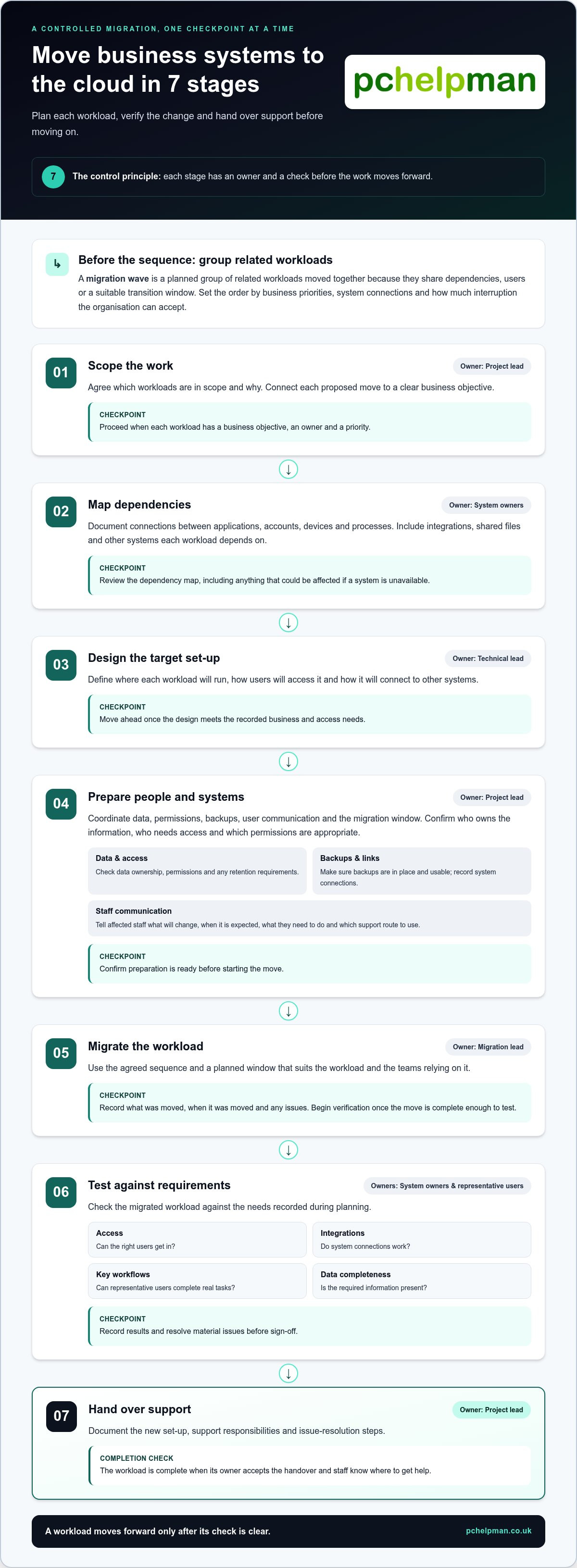
A controlled migration turns a broad technology change into a series of decisions, each with a clear owner and a check before work moves on. A migration wave is a planned group of related workloads moved together because they share dependencies, users or a suitable transition window. Set the sequence according to business priorities, system connections and how much interruption the organisation can accept.
- Scope the work. The project lead agrees which workloads are in scope and why. Proceed when each has a business objective, owner and priority.
- Map dependencies. System owners document connections between applications, accounts, devices and processes. Before proceeding, review the dependency map, including anything that could be affected if a system is unavailable.
- Design the target setup. The technical lead defines where each workload will run, how users will access it and how it will connect to other systems. Move ahead once the design meets the recorded business and access needs.
- Prepare people and systems. The project lead coordinates data, permissions, backups, user communication and the migration window. Confirm these are ready before starting the move.
- Migrate the workload. The migration lead follows the agreed sequence and records what was moved, when and any issues. Begin verification once the move is complete enough to test.
- Test against requirements. System owners and representative users check access, integrations, key workflows and data completeness. Record results and resolve material issues before sign-off.
- Hand over support. The project lead documents the new setup, support responsibilities and issue-resolution steps. The workload is complete when its owner accepts the handover and staff know where to get help.
Prepare systems, users and data before the move
Preparation involves more than scheduling a cutover. Confirm who owns the information, who needs access, which permissions are appropriate and whether any retention requirements apply. Check that backup arrangements are in place and usable, and record the links between applications, devices, accounts and business processes. Tell affected staff what will change, when it is expected to happen, what they need to do and which support route to use. Clear responsibilities reduce last-minute uncertainty.
Migrate, test and hand over each workload
Choose a planned window that suits the workload and the teams relying on it. After migration, test real tasks, not just whether a system opens. Check that users can complete essential workflows, connected systems still exchange information and expected data is present. Compare results with the requirements recorded earlier. Before closing the wave, document the final configuration, support owner and steps for reporting or resolving problems.
Start with a workload whose scope and dependencies are well understood. Use what the team learns to refine later waves. PcHelpMan® provides cloud migration planning to help shape the sequence and implementation around your business needs.
Which business systems should move to the cloud, and which approach fits?
Moving business systems to the cloud doesn’t mean every system has to leave your premises. A mixed setup can be the right long-term choice, not just a temporary step. Decide workload by workload, weighing its business value, technical needs and the amount of control your team wants to retain. Email may suit an online application, while a specialist system with local equipment dependencies may need a different route or further assessment.
SaaS, hosted infrastructure and hybrid migration
Software as a Service (SaaS) gives users access to a provider-managed application online. Hosted infrastructure provides a place to run systems where there may be more control over the environment, but your organisation may also be responsible for more of the software and its configuration. A hybrid arrangement combines cloud services with selected systems kept on-site. The exact split of responsibilities depends on the service and its agreement.
| Model | Suitable use case | Responsibility | Key trade-off |
|---|---|---|---|
| SaaS | Common applications accessed online by staff | Provider manages the application service; your business manages users, access and its information | Less control over the underlying application environment |
| Hosted infrastructure | Workloads needing a more tailored environment | Provider supplies hosting; responsibilities for systems, software and data depend on the arrangement | More control may mean more configuration and management work |
| Hybrid | Businesses moving in stages or retaining some on-site systems | Responsibilities are shared across cloud and local environments | Systems in different locations still need to connect and be supported |
Use the table as a starting point, not as the decision itself. A system that connects closely to local equipment, for instance, may need to remain on-site until its dependencies are understood or changed. A workload with clear access needs and few connections may be easier to consider for an earlier move.
Decide whether a workload is ready to move
Before scheduling a migration, assess how the workload supports daily operations and what would happen if it were unavailable. Check its dependencies, data sensitivity, user access needs and reliance on a stable connection. An outage affecting an optional tool has a different impact from one that stops a core business process.
For each workload, record whether:
- Its importance is clear: the owner understands which activities depend on it.
- Its connections are mapped: linked applications, devices and processes are known.
- Access and information needs are understood: users and data requirements are documented.
- Connectivity suits the work: staff can reach the system reliably enough for its purpose.
- Interruption is manageable: the business has considered the effect of an outage and can plan around it.
If ownership, dependencies or information needs are unclear, pause before assigning a migration date. Further assessment may show that the workload should move later, stay on-site or use a different approach. That’s a sound planning decision, not a failed migration.
How to reduce disruption and verify a business cloud migration
A cutover should have clear checks, named decision-makers and an agreed response if something doesn’t work as expected. Before moving business systems to the cloud, set out how the team will protect data, confirm access and decide whether the new setup is ready for normal use. Downtime can’t always be ruled out, so plan for interruption rather than relying on everything going smoothly.
Use this checklist before the migration window:
- Backups: Confirm which data and systems are covered, who is responsible for recovery and how restoration will be tested.
- Access: Review user accounts, permissions and authentication arrangements for the target environment. Remove access that’s no longer needed and confirm the right people can sign in.
- Dependencies: Check connected applications, devices and business processes, including anything that needs to be available during the move.
- Communication: Tell affected staff what may change, when it may happen, what they should do and how to report a problem.
- Named owners: Assign a person to approve the cutover, carry out technical tasks, test business workflows and make decisions if checks fail.
Tested backups, clear recovery ownership and a documented recovery plan give the team a stronger basis for responding to migration problems. They don’t remove risk, but they make responsibilities and next steps clearer.
Protect access, data and business continuity
Where personal data is involved, identify who is responsible for it and how the planned environment will handle access, storage and recovery. Consider relevant UK GDPR responsibilities and use current guidance from the Information Commissioner’s Office when assessing what applies to your organisation. Keep the review tied to the information and services being moved, rather than treating security as a final sign-off task.
Make backup restoration part of preparation, not an assumption. Agree what needs to be recoverable, who can initiate restoration and how the team will confirm that recovered information is usable. Include these responsibilities in the cutover plan, along with the rollback decision-maker, the conditions that trigger rollback and the steps for returning to the previous setup. If acceptance checks fail, follow the agreed response and record any changes made during the cutover that may need reconciling.
Use acceptance checks before closing the migration
Set pass criteria before the move so the team knows what “working” means. Check that expected data is present, integrations exchange information, users can reach the services they need and essential business tasks can be completed. For example, don’t stop at confirming that a shared workspace opens. Test that the right staff can access the required files and carry out their normal work.
Ask representative users to try their usual workflows and record feedback, test results and unresolved issues. Give every open issue an owner and a next action. Review support needs after launch, then retire old systems only when the agreed checks are complete and the business owner has accepted the handover. PcHelpMan® provides cloud migration support, including help with migration checks and recovery arrangements.
How PcHelpMan® supports businesses moving systems to the cloud
A cloud migration is a business change as well as a technical one. PcHelpMan® provides cloud migration consulting and implementation, shaping the plan around your objectives, existing systems and the way your staff work. This includes considering what should move, in what order, how services will connect and what support people will need during the change.
Plan a migration around your systems and working practices
Moving business systems to the cloud can involve a single workload or a wider programme. PcHelpMan® helps you assess the options and plan a suitable sequence, taking account of system dependencies, business priorities and the effect of change on staff. If your team works across locations, planning can also include cloud hosting configurations and remote collaboration setups suited to its day-to-day tasks.
The aim is a practical migration plan, not a one-off upload. It can set out:
- Workload priorities: which systems best match the business objective and are ready to move.
- Dependencies: how applications, information and working processes connect.
- Implementation needs: what preparation, access arrangements and checks each workload requires.
- Staff impact: who needs to know about changes and how the transition fits around their work.
This gives decision-makers a clearer view of the project before implementation begins. It also helps staff understand what is changing and why, whether the plan involves moving one service first or coordinating connected systems in stages.
Keep support and continuity in view after the move
Once systems are in use, employees may still need help with software, hardware or access issues. PcHelpMan®’s managed IT support and helpdesk assistance can support users as working practices settle into the new setup. Ongoing maintenance and monitoring can also help keep IT systems managed after implementation.
Continuity planning belongs in the project from the outset. PcHelpMan® can connect cloud migration with on-site and off-site backup arrangements and business continuity planning, so recovery responsibilities are considered alongside the new environment. This helps your organisation plan how it would respond if data or a key system became unavailable, rather than treating backup as an afterthought.
For organisations in Brighton & Hove and surrounding areas, PcHelpMan® brings migration planning, implementation and ongoing IT support together in a way that can be tailored to the business. If you’re considering a move, discuss your cloud migration with PcHelpMan® and outline the systems and working needs you want the project to address.
Make your next cloud decision with confidence
The next step doesn’t need to be a commitment to move every system. Choose one business need you want to address, then bring together the people who understand the work, the technology and the impact of change. That shared view can turn moving business systems to the cloud from a broad ambition into a considered project, with decisions that make sense for your organisation.
Look beyond the technical move, too. A useful plan considers how the change fits your team’s working practices and how support and continuity will remain part of the picture as systems evolve. With the right guidance, you can shape the project around your priorities and take each decision at a manageable pace.
PcHelpMan® can help you plan and implement a cloud migration, with managed IT support, helpdesk assistance, backup and business continuity planning to support the wider change. Plan your cloud migration with PcHelpMan® and take a clear first step towards a setup that suits your business.
Frequently Asked Questions
Is moving business systems to the cloud right for every organisation?
No. The right choice depends on what a system does, how staff use it and whether its requirements can be met by a cloud service. For example, a business with specialist equipment connected to an older application may have good reason to keep that workload on-site for now. Organisations in Brighton & Hove can assess each system against practical needs rather than treating cloud migration as a goal in itself.
Can a business keep some systems on-site after moving others to the cloud?
Yes. A business can use cloud services for some workloads while retaining others on-site, creating a hybrid setup. This can be useful when an application depends on local equipment or moving it would add unnecessary complexity. Account for how on-site and cloud systems exchange information, who supports each part and what happens if one side becomes unavailable.
How long does it take to move business systems to the cloud?
There’s no single timescale that applies to every migration. The duration depends on the number and complexity of workloads, how much data needs moving, system connections, preparation and testing requirements. A straightforward application with few dependencies may need less planning than a core system linked to several business processes. An inventory and dependency review help establish a realistic project schedule before setting a cutover date.
What happens if the internet connection fails after a cloud migration?
Users may be unable to reach cloud services that rely on an internet connection until access is restored. The effect depends on the service and how your business uses it. Before migration, identify which tasks would stop, whether any work can continue locally and how staff should handle urgent processes during an outage. Include connectivity in business continuity planning, particularly for teams that rely on cloud applications throughout the working day.
Is cloud storage automatically backed up?
Don’t assume that cloud storage includes a backup arrangement that meets your recovery needs. Storage and backup serve different purposes, and available protection depends on the service configuration and terms. Check what information is covered, how long it is retained, who can restore it and how restoration is tested. A separate backup plan can help address accidental deletion, unwanted changes or loss of access, alongside your wider recovery arrangements.
Can legacy business software be moved to the cloud?
Sometimes, but age alone doesn’t determine whether software can move. The application may rely on a particular operating environment, local hardware, a database or connections to other tools. Document those dependencies and test the software’s essential tasks before choosing a migration route. If its requirements are unclear or the system is business-critical, assess it further before scheduling a move. Keeping it in place temporarily can be a sensible option.
Does moving business systems to the cloud make them more secure?
Not automatically. Security depends on how the service is configured and managed, including account access, permissions, updates, monitoring and backup arrangements. Responsibilities are shared between the cloud service provider and the organisation, and the split varies by service. Review who controls each security task, limit access to what users need and include cloud services in your wider security and recovery processes. Migration is an opportunity to review controls, not a substitute for doing so.
