

What if the biggest business cloud migration risks aren’t in the cloud itself, but in the systems and connections your team relies on every day? A move can expose hidden dependencies, put important data at risk or disrupt essential services if these details aren’t planned for.
Concerns about downtime, data exposure, delays and rising costs are reasonable. Migration isn’t simply a technical transfer. It’s a business change, and the right safeguards depend on the workloads involved, how they connect and how critical they are to daily operations.
This guide explains how to identify and prioritise risks before migration, then plan practical safeguards and fallback arrangements. It covers data protection, legacy systems, integrations, service continuity, timelines and cloud spending. You’ll also see how clear ownership, backup and continuity planning, migration support and ongoing IT management can help keep the transition controlled. Assess each workload on its own terms so your plan reflects how your business operates.
Key Takeaways
- Assess business cloud migration risks workload by workload, including dependencies, users and recovery needs.
- Group risks by their potential impact on data, access, essential services and costs to identify what needs attention first.
- Use a simple risk matrix to compare likelihood, urgency, operational impact and recovery difficulty.
- Plan safeguards in stages, then test data integrity, integrations, access and essential user workflows.
- Connect migration planning with ongoing IT support, monitoring, backup and business continuity arrangements.
Business cloud migration risks: what can go wrong and why it matters
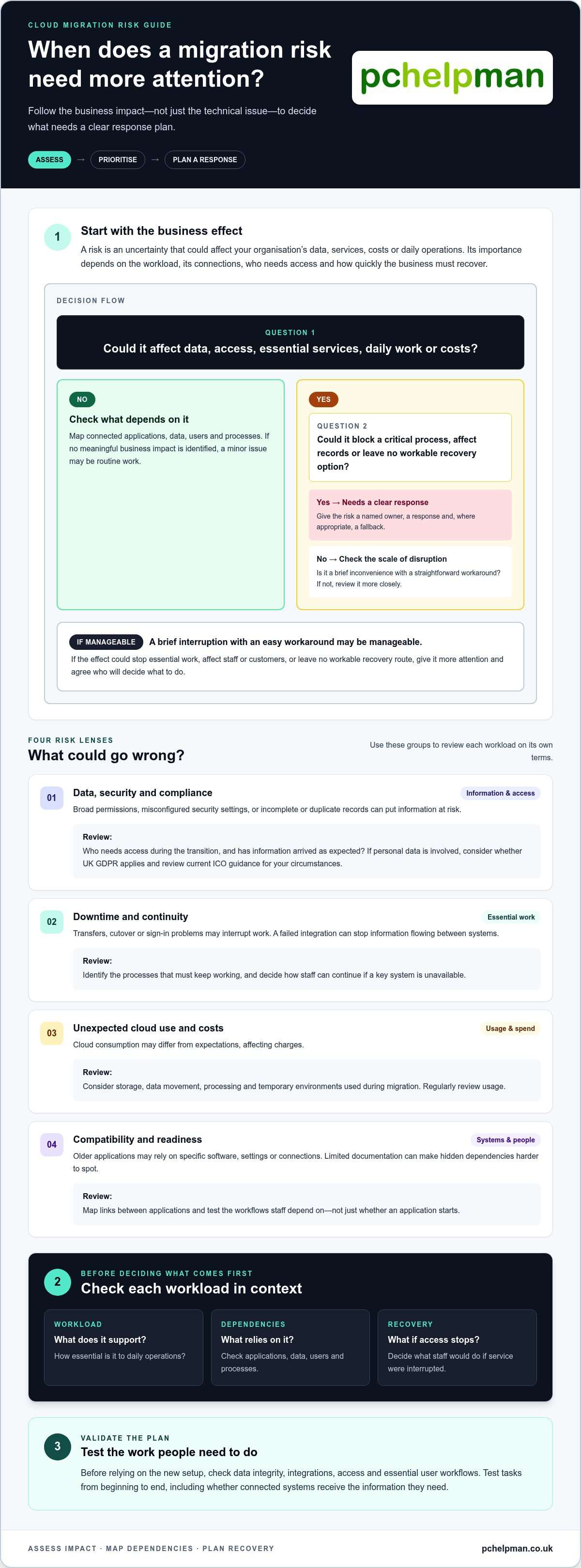
A cloud migration risk is anything uncertain that could affect an organisation’s data, services, costs or daily operations during a move to cloud systems. It could be accidental data loss, an application that won’t connect to another system, unexpected usage charges or staff being unable to access information they need. Business cloud migration risks vary between organisations. Their importance depends on what’s moving, how systems rely on one another, who needs access and how quickly the business needs to recover.
A technical issue becomes a business risk when it could interrupt an important process or cause harm the organisation can’t easily absorb. Give significant risks a named owner, a response and, where appropriate, a fallback. A minor display problem affecting one user may be routine work. If the same fault prevents a team from processing orders or accessing essential records, it needs more attention.
Why cloud migration risks vary between businesses
Moving shared files to a cloud service may involve fewer operational dependencies than migrating an application used to manage bookings, accounts or customer records. The application may rely on databases, user permissions, reporting tools or other systems. If a connection is overlooked, the application might move successfully but still fail to support the work around it.
Legacy systems can be harder to assess. Some have limited documentation, rely on older software or connect to tools that staff use without realising the dependency. Map these links before migration to identify workloads that need closer review. Even a small organisation benefits from proportionate planning: name a responsible person, decide what must keep working and set out how staff can continue if a key system is unavailable.
When a migration risk becomes a business problem
The effect matters more than the technical label. A permissions error could expose records to people who shouldn’t see them. A failed integration might leave staff entering information twice, delay customer responses or interrupt service delivery. For an overview of security issues and controls, see Cloud computing security. The practical question is how a weakness could affect your organisation’s information, people or work.
Not every disruption has the same impact. A brief inconvenience with a straightforward workaround may be manageable. A failure that blocks a critical process, affects records or leaves no workable recovery option needs a clear response plan. Consider the consequences for staff, customers and essential services, then record who will decide what to do if the risk occurs. This keeps planning focused on business impact instead of treating every technical concern as equally urgent.
- Workload: What does the system support, and how essential is it to daily operations?
- Dependencies: Which applications, data, users or processes rely on it?
- Recovery: What would staff do if access or service were interrupted?
The main business cloud migration risks, from security to service disruption
The main risks are connected. A migration can affect who can access information, whether essential work continues, how much cloud capacity is used and whether the organisation is ready to manage the new setup. As a starting point, business cloud migration risks fall into four groups: security, continuity, cost and readiness. The groups help teams consider what could go wrong without assuming every workload faces the same problems.
Data, security and compliance risks
Information can be exposed if permissions are too broad, security settings are misconfigured or data is handled differently than planned. Review access for the people and roles that need it, including during the transition. A transfer can also leave incomplete or duplicate records, so check that information has arrived as expected before relying on it.
Cloud services don’t remove an organisation’s responsibility to understand and manage its own information. Responsibilities vary with the service and how it’s used. If personal data is involved, consider whether UK GDPR applies to the organisation’s processing and review current Information Commissioner’s Office (ICO) guidance for the circumstances. Security planning should cover the full setup, not just the provider’s infrastructure. Carnegie Mellon University’s overview of cloud computing risks also illustrates how weaknesses can arise in different parts of a cloud environment.
Downtime, compatibility and unexpected cloud use
Work may be interrupted during data transfer or cutover, or if people can’t sign in with the expected permissions afterwards. A short interruption may be manageable, but a delay that prevents staff from completing an essential process needs a planned response. An incomplete transfer can leave teams working from different versions of a record, while a failed integration may stop information flowing between an application and another system.
Older applications may behave differently in a new environment. They might rely on a particular operating system, connection or setting, or perform poorly when accessed in a new way. Test the workflows staff depend on, not just whether an application starts. Check that users can complete tasks from beginning to end and that connected systems receive the information they need.
Cloud consumption can also differ from expectations. Storage, data movement, processing and temporary environments used during migration may all affect usage. Without regular reviews, the organisation may face unexpected charges or keep resources it no longer needs. Set a project budget, assign responsibility for reviewing usage and revisit assumptions as actual patterns emerge.
Security risks concern information and access; continuity risks concern essential work; cost risks concern usage and planning; readiness risks concern the people, processes and systems needed to operate the new environment. Keeping these groups visible makes risk discussions more practical. PcHelpMan®’s cloud migration support helps businesses connect migration decisions with operational needs and ongoing IT support.
How to prioritise cloud migration risks by business impact
A useful risk assessment doesn’t need complex scoring. Rate each risk as low, medium or high across four areas: likelihood of it happening, operational impact if it does, urgency of addressing it and recovery difficulty. A risk that’s unlikely but could stop an essential process and take considerable effort to resolve may still deserve early attention.
Use ratings to prompt a decision, not to create false precision. High-impact, urgent or difficult-to-recover risks should have a named owner, a response and an agreed escalation route. For example, the possibility of staff losing access to a core system during cutover could call for a clear decision-maker and an alternative way to handle essential work. This is an illustrative planning example, not evidence of a client incident.
Assess critical workloads, dependencies and recovery needs
Start with the processes that keep the organisation operating, such as customer service, finance, communications or order handling. For each, identify the systems, user accounts, devices, data and third-party services it depends on. Ask the relevant business owner how long the process could be unavailable and what data could be recreated or recovered. These expectations show which workloads need careful sequencing and fallback planning.
Create a useful migration risk register
Record each risk in plain English: what might happen, why, which workload it affects and the likely business consequence. Assign one accountable owner and note a warning sign that should prompt action. Review the register with technical and business stakeholders before making migration decisions, so operational priorities and system dependencies are considered together.
Copy the compact template below into a planning document. The example is illustrative; replace it with a risk identified in your own assessment.
| Risk | Affected service | Owner | Warning sign | Fallback |
|---|---|---|---|---|
| Connection fails after cutover (illustrative) | Customer booking workflow | Named business owner | Test booking does not appear in the linked system | Use an agreed manual process and escalate to the migration lead |
| Identified risk | Service or process | Person accountable | Signal that action is needed | Practical way to continue or recover |
Prioritise the register by considering all four ratings together. A low-likelihood issue with a simple workaround may need monitoring. A risk that could interrupt a critical process and has no tested fallback should be addressed before that workload moves. Record who can pause, change or escalate the migration if warning signs appear. Revisit ratings as discovery and testing reveal more about dependencies. This gives teams a practical way to manage business cloud migration risks according to their own operations, rather than treating every technical issue as equally serious.
Practical safeguards to reduce business cloud migration risks
Good safeguards follow a clear sequence: prepare the workload, move it in a controlled way, validate that it works for users, then review what needs attention after cutover. This can’t remove every possibility of disruption, but it helps the team spot problems earlier and respond consistently.
Before migration: prepare data, access and recovery
Agree what’s in scope and check the condition of the data, user permissions and known dependencies. Confirm that backups and recovery arrangements are suitable before making changes, and identify who will start recovery if needed. Set practical test criteria with the people who rely on the service. Define who owns each decision, how staff will be updated and which warning signs should prompt escalation.
During and after cutover: validate, monitor and learn
Test more than whether the system opens. Representative users should check that their access is correct, connected applications exchange information, records are complete and essential tasks work from start to finish. After cutover, review service availability, performance, user reports and cloud usage. Log issues, assign follow-up actions and update continuity arrangements based on what the team learns.
Use this checklist as a working plan. Tailor each step to the workload and the impact its failure could have on the business.
- Confirm scope and dependencies. Record the data, applications, integrations, users and devices involved. Resolve unclear ownership or dependencies before the move proceeds.
- Set up recovery arrangements. Confirm backups are available and establish who can authorise recovery. Agree what data or service state must be restored and what the team will do if recovery is needed.
- Agree tests and decision points. Write down the key user workflows to test, who will test them and what counts as a failure. Set a clear point at which the migration lead and business owner will decide whether to continue, pause or use the fallback.
- Plan fallback and communications. Specify the alternative way to carry out essential work if the new service isn’t usable. Name who will make the decision, escalate technical issues and tell staff what to do.
- Move and validate in a controlled way. Follow the agreed migration sequence, then check permissions, integrations, data integrity and priority workflows with representative users before treating the service as ready.
- Review after cutover. Monitor the agreed indicators, record issues and assign owners and actions. Revisit the fallback and continuity plan if findings show that assumptions need to change.
A fallback is a decision plan, not a promise that disruption can’t happen. Clear ownership and timely communication help staff understand what is happening and what to do next. PcHelpMan provides cloud migration planning and implementation, alongside backup and business continuity planning, to help organisations prepare for the move and manage the work that follows.
Get business cloud migration support that continues after cutover
Migration planning shouldn’t end once workloads have moved. The first days and weeks afterwards can reveal practical issues that weren’t obvious during preparation, such as a staff member needing different access or a process behaving differently in the new environment. Connecting assessment, implementation and ongoing support helps keep these details in view and gives the organisation a route for reviewing problems and deciding what needs attention.
What joined-up migration and IT support can cover
Migration consulting starts with the organisation’s workloads, dependencies and business priorities. That picture shapes an implementation plan around how people use systems, which processes matter most and what needs to be ready before cutover. The right approach differs between a business moving shared files and one moving applications that support customer or financial work.
After migration, remote monitoring and helpdesk support can help identify and address technical issues as they arise. Backup and business continuity planning complement this work by setting out how important information and operations can be recovered if a problem affects service. Together, these arrangements extend risk management beyond the move itself, without assuming every issue can be prevented.
- Migration consulting and implementation: align the plan with workloads, dependencies and operational priorities.
- Ongoing IT support: give staff a route to report problems and get help using their systems.
- Remote monitoring and management: support oversight of IT systems after the transition.
- Backup and continuity planning: prepare recovery arrangements for data and business operations.
These safeguards work best when responsibilities are clear. Agree who reviews reported issues, who decides whether a problem affects an essential process and how staff will be kept informed. A follow-up review can capture what is working, identify recurring problems and update support or continuity arrangements as the organisation settles into the new environment. This keeps business cloud migration risks part of operational planning rather than treating them as a one-off project concern.
A clear next step for Brighton & Hove businesses
For businesses in Brighton & Hove, PcHelpMan® brings more than 25 years of experience to cloud migration consulting and implementation, alongside managed IT support, backup and business continuity planning. Start by setting out the workloads you’re considering, the systems they depend on, the processes you need to protect and any concerns about data, disruption or ongoing support.
This context helps shape a migration and support plan around your organisation’s needs. PcHelpMan® provides cloud migration consulting and implementation for businesses in Brighton & Hove.
Make your next migration decision with confidence
Before setting a migration date, ask one practical question: what does the business need to keep working, and what will it do if a key workload doesn’t behave as expected? Clear answers turn business cloud migration risks into decisions with owners, sensible safeguards and a plan for what happens next.
PcHelpMan® brings more than 25 years of experience to cloud migration consulting, managed IT support, backup and business continuity planning. These services can be considered together, so the migration plan reflects both the move itself and the support your organisation may need afterwards. The approach should match your workloads, dependencies and priorities.
If you’re weighing up a cloud move, outline the systems involved and the concerns you’d like to address. Discuss your business cloud migration with PcHelpMan® and take a considered next step for your organisation.
Frequently Asked Questions
What are the biggest business cloud migration risks?
The biggest risks are those that could expose information, interrupt essential work or leave systems unusable after the move. A business might transfer shared files successfully but discover that its payroll application can no longer retrieve the records it needs. Incomplete data, unsuitable access settings, overlooked connections, unexpected usage and limited staff readiness can all matter. Which deserves most attention depends on the workload and the consequences of failure.
Can a cloud migration cause business downtime?
Yes. Staff may temporarily lose access during a transfer, cutover or change to sign-in arrangements. The effect could be minor for a non-essential tool, but more serious if a team can’t process bookings or invoices. Schedule changes with affected staff in mind, agree how they’ll work if access is delayed and avoid retiring the previous setup until checks show that the new one supports required tasks.
How can a business reduce the risk of data loss during cloud migration?
Keep a separate, current backup and verify that it can be accessed before migration work begins. Agree how the team will compare the original and transferred information, such as checking key folders, record totals or a sample of important files. For data that changes during transfer, decide how updates will be captured so new entries aren’t missed. Restrict who can alter the source during the final transfer window.
Is cloud migration secure for a small business?
It can be, if security is planned around the information and people involved. A small business can start by limiting access to named users, using strong sign-in protections and removing accounts that no longer need access. Review settings before staff begin using the new environment, and assign responsibility for responding to security concerns. If personal data is involved, consider the organisation’s circumstances and relevant UK guidance.
How do you prioritise cloud migration risks?
Rank risks by what they could prevent the business from doing, how soon action is needed and how difficult recovery would be. A possible delay to a non-essential report may be less urgent than a risk affecting the ability to take customer payments. Record the reason for each priority, who is accountable and what change would trigger action. Revisit the ranking if testing reveals new dependencies.
What should a cloud migration fallback plan include?
A fallback plan should say who can pause or reverse a change, what conditions would prompt that decision and how essential work will continue in the meantime. Specify how staff will be informed, where they should direct urgent issues and how updates created during the disruption will be handled afterwards. Before relying on the plan, walk through the steps with the people responsible and check they can access the information and tools they need.
Should a business use an IT consultant for cloud migration?
An IT consultant can help when internal teams lack time to map dependencies, assess workloads or coordinate technical work with business needs. This can be especially useful if older applications connect to several systems or if disruption would affect customer-facing work. PcHelpMan® provides cloud migration consulting and implementation, alongside IT support for businesses in Brighton & Hove. Discuss your workloads, dependencies and support needs with PcHelpMan® to plan your next step.


