

The biggest cloud migration challenge is moving the right data and systems in the right order without disrupting day-to-day work. Cloud migration services in Brighton can help businesses assess what to move, how to move it and when. A migration may take weeks to months, depending on its scope and complexity.
It’s easy to focus on the move itself, but success also depends on clear business goals, suitable infrastructure and careful testing. This guide explains how to assess those needs, plan for common challenges and manage your cloud environment after migration.
We’ll also explain the difference between a one-off migration and ongoing cloud solutions, so you can identify the support that may help at each stage. From choosing a migration approach to keeping systems secure and well managed afterwards, the aim is to make the process clear and manageable.
Key Takeaways
- Map your data, applications and dependencies before setting a migration order or timeline.
- Compare rehosting, retaining, replatforming, refactoring and retiring to choose a suitable approach for each workload.
- Assess current infrastructure alongside business goals to guide your choice of public, private or hybrid cloud.
- Plan data transfer, system configuration and testing together to reduce disruption during the move.
- Make post-migration monitoring, security, backups and support part of your cloud plan, not an afterthought.
Cloud migration planning and assessment
A cloud migration assessment identifies what to move, when to move it and in what order. For businesses considering cloud migration services in Brighton, this planning connects technical choices with operational priorities.
Start by reviewing workloads, setting business goals and choosing a cloud model. Then sequence the migration, configure systems and test key processes. A migration can take weeks to months, depending on its scope, data volume, legacy systems, available resources and testing cycles.
Workload assessment
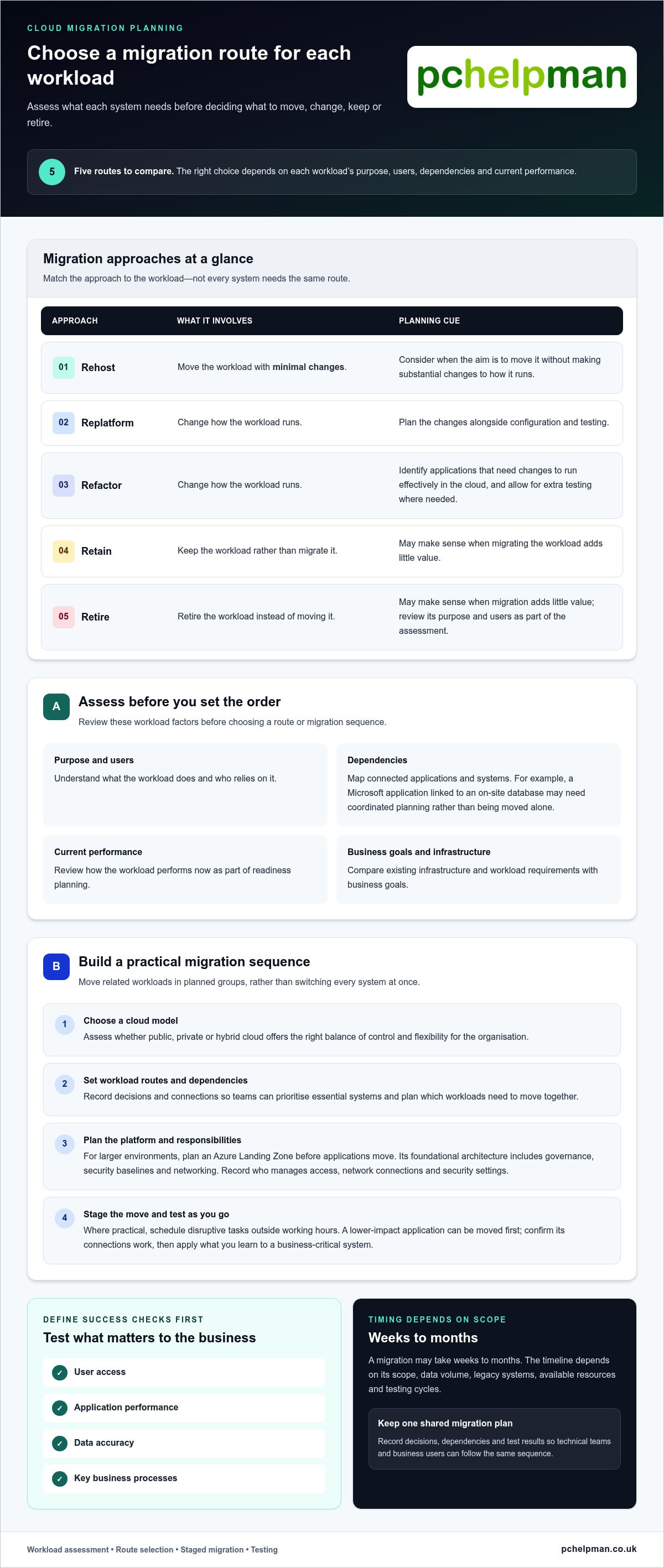
Before choosing a migration route, review each workload’s purpose, users, dependencies and current performance. For example, a Microsoft application connected to an on-site database may need coordinated planning rather than being moved alone. Classify workloads as rehost, retain, replatform, refactor or retire. This helps prioritise essential systems and identify applications that need changes to run effectively in the cloud.
Cloud readiness and tailored strategies
Readiness planning compares existing infrastructure with business goals and workload requirements. Consider whether a public, private or hybrid cloud offers the right balance of control and flexibility. Then match each workload to an approach: rehosting moves it with minimal changes, while replatforming or refactoring changes how it runs. Retaining or retiring a workload may make sense if migration adds little value. A tailored strategy links each choice to the organisation’s needs.
For businesses comparing cloud migration services in Brighton, readiness findings clarify the scope before implementation. They also reveal which applications depend on older systems and where extra testing may be needed. This gives teams a practical basis for decisions about sequencing, platform choice and the resources required at each stage.
Staged, out-of-hours planning
A staged migration moves related workloads in planned groups instead of switching every system at once. Where practical, schedule disruptive tasks outside working hours, and set a clear sequence for user access, data transfer and testing. For example, migrate a lower-impact application first, confirm its connections work, then apply what you learn to a business-critical system. Agreeing responsibilities and recovery steps helps teams respond to issues at each stage.
For larger environments, an Azure Landing Zone provides foundational architecture for migrated workloads, including governance, security baselines and networking. Plan this platform before moving applications, and record who manages access, how networks connect and which security settings apply. This gives each workload an organised environment.
Define success checks before implementation begins. Test user access, application performance, data accuracy and key business processes. A cloud migration assessment can help minimise risks and maintain service level agreements after the move. Keep decisions, dependencies and test results in one migration plan, so technical teams and business users can follow the same sequence.
How do you manage cloud environments after migration?
After migration, manage cloud systems through monitoring, support, recovery planning and clear communication. A suitable approach keeps everyday services usable while teams address faults and refine the environment.
Post-migration support and communication
Set out who handles access issues, application faults and data recovery after each workload moves. A support process should record tickets, assign ownership and track recurring problems, helping teams identify whether an issue stems from configuration, connectivity or user access. Share planned changes and service updates with staff through an agreed channel.
Disaster recovery planning should define which systems to restore first and how teams will recover data from backups. In QCL’s migration example, the on-site firewall’s VPN service was decommissioned because remote employees no longer needed it to access systems. This illustrates why post-migration reviews should revisit old access methods instead of carrying them forward automatically. Brighton businesses can also use local managed IT support for ongoing monitoring and user assistance.
Consulting and implementation support
During implementation, consulting helps translate business priorities into platform decisions, migration tasks and testing. Agree responsibilities for data transfer, system configuration, user communication and issue escalation before work begins. For hybrid environments, map connections between cloud services and any systems that remain on-site. This makes dependencies visible and helps teams limit avoidable disruption.
When comparing providers serving Brighton and East Sussex, look for relevant migration experience, clearly described implementation responsibilities and customer feedback about support after launch. Certifications can indicate assessed knowledge or processes, but check that they relate to the work your project needs. Reviews are most useful when they describe communication, issue handling and ongoing support, rather than offering general praise alone.
Costs, services and platform support
Cloud migration costs depend on business size, data volume and the complexity of existing systems. The price depends on the project and is provided after a quote request; scope, legacy applications, testing and implementation support all affect the work involved. Services may cover assessment, planning, data transfer, configuration, testing and post-migration support.
Brighton providers’ platform capabilities vary. AWS, Microsoft Azure and Google Cloud are distinct examples, so match a provider’s experience to the platform and workload in your plan. Ask how its approach handles access, networking, backups and any hybrid connections. A useful comparison focuses on those practical requirements, not a platform name alone. For help shaping migration and ongoing support decisions, consider cloud migration planning support.
Data transfer, system configuration and application updates
Cloud migration moves business data, systems and software from on-site servers to cloud data centres accessed through the internet. A careful transition coordinates data transfer, application configuration and testing, allowing teams to identify problems before users rely on the new environment.
Moving data, systems and software
Start by mapping each application to its data, users and connected services. Then decide what transfers together, what needs reconfiguration and how teams will test access afterwards. A lift-and-shift migration moves an application without modifying it, whilst other workloads may need platform changes. For example, businesses often migrate on-premises file data to Microsoft 365 SharePoint during their cloud migration services Brighton project.
Prepare the destination before moving business data. Configure user permissions, network connections and application settings, then transfer information in the planned order. Check that files open correctly, users have the right access and connected applications can exchange data. If an application depends on an on-site database, test that connection before switching users over. This sequence makes configuration issues easier to isolate.
Data transfer alone doesn’t complete the transition. Applications may need updates to work with cloud services, or require modernisation, refactoring into cloud-native applications or rebuilding. These options involve different levels of change. Compare the effort with the application’s purpose, dependencies and future role, then choose a suitable route in your cloud migration strategy.
Legacy compatibility and service continuity
Legacy compatibility checks whether older applications can operate with new cloud infrastructure and connected systems. Record supported operating requirements, integrations and data dependencies, then test each critical process before cutover. If an application can’t move immediately, retaining it temporarily may keep an important service available while other workloads transition. Account for its ongoing connection to cloud systems.
Many organisations retain one physical server after migration to support legacy virtual machines. This shows that moving to the cloud doesn’t always mean removing every on-site system. Map how retained servers exchange data with cloud workloads, who needs access and how those connections will be tested. Documenting the arrangement helps teams manage a mixed environment without overlooking remaining dependencies.
Plan cutover around the business process, not just the transfer task. Identify when users must stop editing files, how updates made during transfer will be handled and which checks confirm the new system is ready. Test sign-in, application functions and representative data before directing staff to the cloud version. For a system that supports customer work, schedule the switch to limit disruption and explain any temporary downtime clearly.
After each migration stage, compare results with the agreed checks for data accuracy, application behaviour and user access. Record defects, assign follow-up actions and retest affected workflows before moving dependent systems. This helps catch configuration gaps early and maintain service continuity as more business software moves to the cloud.
Assessing existing infrastructure and business goals
A useful assessment links current infrastructure to the outcomes a business needs from cloud environments. Review hardware, applications, connections and policies together, then prioritise changes against goals such as agility, performance or scalability.
Reviewing on-premises infrastructure
Begin with an inventory of on-premises servers, storage, network equipment and business applications. Record each item’s function, condition, support dependencies and users, then map the services that rely on it. This reveals ageing hardware that may affect migration choices and systems to replace, retain or move. Include shared services such as identity, email and file access, since several applications may depend on them.
Next, compare current infrastructure capacity with actual workload demands. Review storage use, processing needs, peak periods and growth plans, then note where existing hardware limits performance or creates maintenance pressure. For example, a database supporting order processing may need a different cloud design from an archive used occasionally. The assessment should link each proposed move to a business objective, rather than treating migration as a like-for-like equipment swap.
Set goals to guide decisions. A business seeking greater flexibility may prioritise systems that adapt to changing demand, while one focused on performance may first assess applications with slow response times. Cost savings can also be an objective, but the assessment should examine the existing systems and migration complexity behind that aim. Ranking goals helps teams weigh trade-offs when selecting a public, private or hybrid model.
Governance and policy gaps
Before moving data, document how current policies manage user access, data handling, backups and system changes. Compare those practices with the controls planned for the destination environment. For example, identify who approves new accounts, how departing staff lose access and which roles can change system settings. These checks expose policy gaps that could otherwise follow workloads into the cloud.
Then define responsibilities and operating rules for the new environment. Record who owns each workload, who reviews access and how configuration changes are approved. Check how backup and recovery arrangements align with business priorities, and include monitoring responsibilities in the plan. Clear governance helps teams apply consistent controls across cloud environments instead of relying on informal decisions or assumptions.
Finally, turn assessment findings into a prioritised action list. Mark dependencies, hardware or software constraints, policy updates and business owners for each workload. Link each action to a goal, such as improving scalability or reducing reliance on ageing premises-based equipment. This gives decision-makers a practical basis for sequencing migration work and assessing whether the proposed environment fits the organisation’s needs.
Cloud migration versus ongoing cloud solutions
A migration project moves selected workloads into a cloud environment. Ongoing cloud solutions keep that environment secure, supported and aligned with changing business operations. Planning for both gives the move a clear destination and helps prevent cloud systems becoming an unmanaged extension of existing infrastructure.
Where the migration ends
A migration has defined tasks: prepare the destination, transfer workloads, configure access and test business processes. It ends when agreed checks show that staff can use the new systems and essential data is available. For example, a team might confirm that shared files open, permissions work and a business application connects to the services it needs.
The handover should include an accurate record of the new setup. Document which workloads moved, which remain on-site, who owns each system and how users get support. If a hybrid environment retains an older application, note its connections and dependencies. These details give the operations team a usable starting point, rather than leaving it to reconstruct migration decisions later.
What ongoing cloud support covers
Ongoing support focuses on the environment after launch. It can include monitoring systems, maintaining configurations, managing access, reviewing backups and responding to technical issues. The work required depends on the business’s applications and responsibilities. A small organisation with straightforward cloud tools may need a different support arrangement from an enterprise with connected legacy systems and several user groups.
Set a routine for reviewing cloud operations. Track recurring faults, check that backup processes run as intended and review whether access still matches staff roles. When an application changes, assess the effect on connected services before updating the environment. These regular actions help identify operational issues and keep the platform aligned with how people work.
Build a practical cloud roadmap
A cloud roadmap connects migration decisions with future improvements. List upcoming application changes, security reviews, backup checks and planned user or business changes. Assign an owner to each task and record what triggers a review. For instance, a new remote-working process may prompt a review of user access and connectivity. This makes ongoing cloud management part of normal planning.
Migration and ongoing support aren’t interchangeable. A project may be enough when workloads are stable and internal staff can manage daily operations. Ongoing assistance is useful when monitoring, maintenance or cloud changes need consistent ownership. Choose based on the work that must continue after launch, not simply the technical move.
To plan migration and ongoing cloud support around your business operations, discuss your cloud requirements.
PcHelpMan®: Cloud solutions and migration
PcHelpMan® supports businesses planning a cloud move or needing help after migration. Its cloud solutions and migration service can help assess requirements, plan the transition and move suitable systems and data. Once workloads are in place, on and offsite backup solutions can support data protection, while remote and on-site support helps address technical issues as they arise.
Consider getting support if your team is unsure what to migrate, needs help coordinating the move or wants continuity support afterwards. Data recovery is also available when lost or inaccessible data creates a problem. The right next step depends on your current systems, business priorities and the support you need after moving.
Contact PcHelpMan® to discuss your cloud migration requirements.
Plan your next step with confidence
Your next cloud decision can start with a simple question: what should your systems make easier for your team? Choose a practical priority, such as helping staff work smoothly across locations or making business information easier to access. A clear starting point gives you a useful basis for discussing the change and deciding what support would help.
If you’re considering cloud migration services in Brighton, PcHelpMan® offers cloud solutions and migration, alongside remote and on-site support. Data recovery is also available if you’re dealing with lost or inaccessible business information. Whether you’re preparing for a move or need help with a current issue, outline what your team needs and where it’s getting stuck.
Contact PcHelpMan® about cloud migration to discuss a practical next step for your business. A considered plan can help you move forward at a pace that suits your priorities.
Frequently Asked Questions
What are the biggest challenges in migrating to the cloud?
The biggest challenges are managing dependencies, protecting data and keeping essential work available during change. A staff member may rely on a shared folder, an older application and a local printer, even if those connections aren’t recorded. Mapping real user workflows can uncover hidden links. Also plan how permissions, sign-ins and support requests will work in the new environment, rather than focusing only on transferring files.
How easy is it to migrate to a cloud-based solution?
Migration is simpler when services are compatible, dependencies are understood and users need few changes. Moving a standalone file store can be more straightforward than transferring an application connected to older databases or specialist equipment. A practical first step is to identify who uses each system and what tasks they perform. This helps reveal training needs and gives teams a chance to adapt familiar processes before the switch.
What is the typical timeline for migrations?
A cloud migration can take weeks to months, depending on company size, complexity and infrastructure. The schedule is also shaped by data volume, legacy systems, migration strategy, available resources, testing and validation cycles. For example, a project involving several connected applications needs coordination between the teams responsible for each system. A timeline should include preparation and user testing, not just the planned transfer window.
How long does a typical cloud migration take for a UK small business?
There isn’t one standard duration for a UK small business migration: scope and system complexity shape the timeline. A business moving a limited set of compatible services has fewer dependencies to coordinate than one retaining older applications or linking cloud tools with on-site systems. List the systems, data and people involved first. That inventory helps build a realistic sequence, including time for staff checks and resolving issues found during testing.
What UK data protection, GDPR and data residency requirements apply to cloud migration?
GDPR is relevant to data security and compliance during cloud migration, according to the European Union. In practice, assess what personal information is moving, who can access it and where it will be stored or processed. Check the cloud environment’s data-location options and document how information flows between services. Data residency needs depend on the organisation’s circumstances and obligations, so include them in planning rather than assuming every cloud setup handles data identically.
What are the main risks of cloud migration and how can downtime or data loss be prevented?
The main risks include incomplete transfers, broken application connections, access errors and interruptions to business processes. Reduce them by keeping a verified source copy, testing sample records and checking critical user tasks before switching everyone over. Set a clear cutover point and agree how teams will pause changes during transfer. For important systems, document who can make the switch back and how staff will report problems.
Do Brighton cloud migration providers offer ongoing cloud management, security and support?
Some providers combine migration with ongoing management, security measures and user support, though service scope varies. In Brighton & Hove, PcHelpMan® offers cloud solutions and migration, managed services, cybersecurity support, remote monitoring and management, and helpdesk assistance. These services can meet different needs, from planning a move to maintaining systems afterwards. Clarify which responsibilities your internal team will retain, so support arrangements fit your workloads and day-to-day operations.
How do Brighton cloud migration providers compare on experience, certifications and customer reviews?
Compare relevant migration experience, check that certifications relate to your project, and look for customer reviews describing communication, issue handling and support after launch.


