

A Brighton business facing a failed drive can arrange an assessment and receive a quote based on the recovery work required. PcHelpMan® provides business data recovery in Brighton for individual drives and damaged storage environments, including server or RAID systems. Start by describing what happened and how the device is behaving.
A drive problem can put important files and day-to-day work out of reach, so it’s understandable to want a clear process before sending equipment anywhere. Avoid repeatedly trying to access a drive that has failed; sharing its symptoms and any recent changes can help guide the initial assessment.
This guide explains how Brighton firms can prepare and send drives, what to expect from a recovery assessment and firm quote, and how server or RAID recovery can be arranged. You’ll also learn which details help the assessment and what to consider when choosing the right recovery route for your business.
Key Takeaways
- Describe what happened to the drive and any unusual sounds or behaviour when arranging its submission.
- Package the drive securely and protect business data by keeping encryption details separate from the device.
- A recovery assessment helps establish the likely work involved before you decide whether to proceed with the quote.
- For server or RAID failures, keep the system’s configuration and drive order intact to support diagnosis.
- After recovery, consider backup and cloud options to help reduce disruption if storage fails again.
How do I get my drive to you from Brighton?
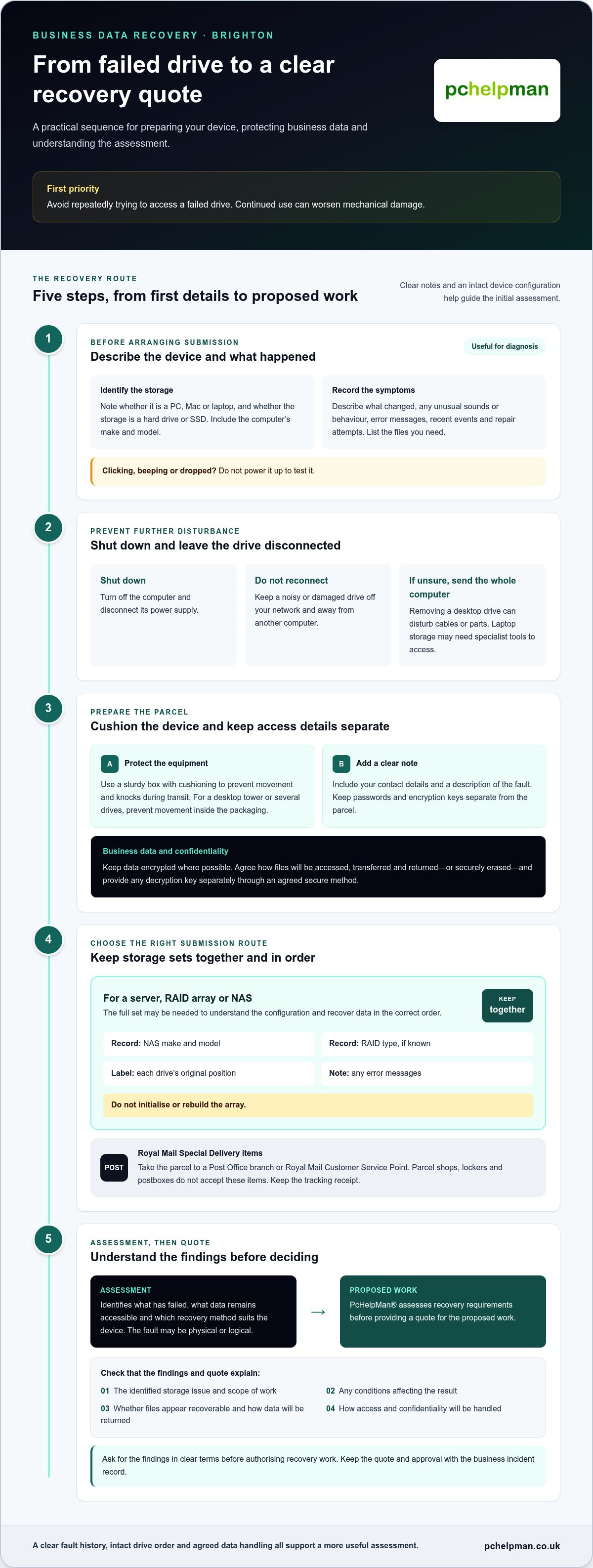
Before arranging recovery, identify the device and describe what happened. Note whether it’s a PC, Mac or laptop, and whether the storage is a hard drive or SSD. Include the computer’s make and model, the files you need, and recent events such as a drop, liquid spill or failed update. If a drive clicks, beeps or has been dropped, don’t power it up to test it. Continued use can worsen mechanical damage.
A desktop PC or Mac may have a removable storage drive, but taking it out can complicate diagnosis if cables or parts are disturbed. If you’re unsure how to remove it safely, send the whole computer. For a laptop, include its model because some storage is difficult to access without specialist tools. An SSD has no spinning platters, unlike a mechanical hard drive, but it can still fail electronically or become inaccessible.
Before packing, write down the device’s symptoms and follow these steps:
- Shut the computer down and disconnect its power supply. Don’t reconnect a noisy or damaged drive to your network or another computer.
- Place the drive or device in a sturdy box, using cushioning to prevent movement and knocks during transit.
- Include your contact details and a clear note describing the fault. Keep passwords and encryption keys separate from the parcel.
Royal Mail accepts Special Delivery items only at Post Office branches and its own Customer Service Points. Parcel shops, lockers and postboxes don’t accept these items, so take the package to the correct counter and keep the tracking receipt. For a desktop tower or several drives, use packaging that prevents movement. Label multiple drives so their original positions are clear.
For a RAID array or NAS, don’t send only the drive that appears faulty. The full set may be needed to understand the array configuration and recover data in the correct order. Record the NAS make and model, RAID type if known, drive bay positions and any error messages. Keep the unit and drives together where possible, and don’t initialise or rebuild the array.
Before recovery work begins, establish how confidential files will be handled: who can access them, how recovered data will be transferred, and how copies will be returned or securely erased. Keep business data encrypted where possible, and provide the decryption key separately through an agreed secure method.
Improper disposal can leave files accessible on discarded drives. Deleting files doesn’t necessarily erase their contents; data may remain recoverable until overwritten. Audit storage devices before disposal, use professional data wiping to high-tier sanitisation standards, or arrange secure destruction. Physical destruction should damage the platters inside a hard drive, while recycling should follow secure data destruction before components are processed.
Recovery assessment and firm quotes
A recovery assessment identifies what has failed, what data remains accessible and which recovery method suits the device. The assessment considers the symptoms, condition, storage type and whether the fault is physical or logical. For example, a drive that disappeared after a software update needs a different diagnosis from one that stopped working after impact.
Give a clear account of what happened before the failure. Include error messages, recent changes and any repair attempts. Mention whether the device contains a single drive, a RAID array or network-attached storage. This helps the assessment take connected systems into account rather than treating one disk as the whole problem.
A diagnostic assessment and recovery work are distinct stages. Ask what the assessment covers, such as inspection, fault-finding or a recovery plan. PcHelpMan® assesses recovery requirements before providing a quote for the proposed work. The quote should explain the identified storage issue, the scope of work and any conditions affecting the result. Recovery requirements vary with the fault, device and work involved.
Ask for the findings in clear terms before authorising recovery work. A useful report explains whether the drive has physical damage, whether files appear recoverable and how recovered data will be returned. For a business, it should also address access and confidentiality for customer records, payroll files or shared folders. Keep the quote and approval with the incident record.
How long does business data recovery in Brighton usually take, including emergency recovery? Timing depends on the fault, the drive’s condition, the volume of data, and whether the device is part of a server or RAID system. Emergency priority can affect scheduling, but complex mechanical damage or multiple drives can still require careful diagnosis and recovery work.
RPO and RTO help connect recovery decisions to business impact. Recovery Point Objective (RPO) describes how much recent data the business can afford to lose. Recovery Time Objective (RTO) sets the acceptable time for restoring access to systems. A firm with daily backups may tolerate a different recovery point from one processing live orders throughout the day.
For a practical assessment, record which services depend on the failed storage, the latest usable backup, and the files needed first. A Sussex organisation might prioritise its accounts system and shared project folders before archived material. That information helps shape recovery priorities and supports a more useful quote. For wider continuity preparation, explore recovery preparation.
Business server and RAID recovery
A server failure can interrupt shared folders, databases, email or business applications at once. Identify which services have stopped and whether users can still reach any files. For example, a failed accounts server may prevent the finance team from accessing invoices even when other network services remain available. Before changing anything, record the server model, operating system, storage layout and error messages.
RAID combines drives to provide capacity, performance or redundancy, depending on its configuration. It does not replace a backup. A failed drive, controller fault or damaged file system can affect access across the array. Mirroring keeps duplicate data across drives, while parity-based configurations distribute recovery information. The exact layout matters, so preserve the original drive order and label each drive by its bay.
Take these steps before attempting a restart or rebuild:
- Record warning lights, startup messages and management-console alerts.
- Note which drives show faults, but don’t remove or swap them casually.
- Stop repeated reboot attempts if the server reports storage errors.
- Keep configuration notes, recent backup details and administrator information available for diagnosis.
A rebuild can write data across an array and place extra demands on its remaining drives. If the configuration or failed-drive order is wrong, recovery may become harder. Don’t initialise a disk, create a new array or accept a prompt to format storage. If a NAS reports a degraded volume, preserve its current state and note the warnings instead of starting a repair wizard.
Server recovery also means understanding system dependencies. A database may rely on transaction logs, while a virtual server may store its operating system and business files across separate volumes. Tell the recovery team which applications are critical, which data changed most recently and what the latest usable backup contains. This helps distinguish files needed for immediate operations from older archives.
For a multi-drive system, prepare an inventory of the server or NAS model, RAID configuration if known, drive bay positions, fault messages and recent changes. Include controller replacements or power interruptions. A photograph of the drive bays or management screen can help with diagnosis, particularly if some configuration details are missing.
Disaster recovery planning should cover both storage recovery and restoring business services. A backup may protect files, but staff may also need application settings, permissions and network connections restored. Document which systems depend on the server and the order they should return. This creates a practical priority list, from essential shared files to less urgent archived data.
Diagnosis, quotes and recovery process
A structured response protects affected devices and gives the assessment useful context. Record what happened, when access stopped and which files or systems matter most.
Responding to Data Loss
After data loss, stop using the affected device and disconnect it from the network if safe. Avoid restarting it, installing recovery software or saving new files to its storage. These actions may overwrite information that could still be recovered. If a shared folder disappears, pause work that writes to the same storage and record which users or systems are affected.
How should a business respond to data loss to avoid making recovery harder? Stop activity that could write to the affected storage, preserve the device’s current state and document the symptoms. Note whether files vanished after deletion, a failed update or a power interruption.
Keep an incident record with the device name, error messages, timeline and actions already taken. If a server or NAS is involved, tell staff not to run repair or rebuild prompts. Deleted files may remain in storage marked as available, so new writes can reduce the chance of restoring them.
Diagnosis and Recovery Steps
Diagnosis starts with the device type, reported symptoms and the history recorded by your team. A technician can distinguish logical problems, such as damaged file records, from physical faults affecting the storage itself. That distinction guides the recovery method and clarifies the work covered by the quote.
The assessment should identify the affected device, the proposed recovery steps, and the data priorities you supplied. For example, a business may need current project folders before older archive material. A clear quote describes the scope of work and how recovered data will be returned. The price depends on the case and is given after a quote request.
Once you authorise the work, recovery may involve creating a controlled copy of accessible storage before attempting file extraction. This helps protect the original device during analysis. The recovery team can then organise retrieved files for review, allowing you to compare the results with the business priorities recorded earlier.
Before closing the incident, document which files were recovered and where they were transferred. Open representative documents, spreadsheets or database files to confirm they work for their intended purpose. Record any systems that still need restoration from backup, and keep the recovery details with your disaster response notes.
Business data recovery for Brighton firms
For Brighton firms, a storage failure can affect more than the files on one device. Shared systems, customer records and work schedules may depend on the same server or network storage. Identify what stopped working, preserve affected data and keep a clear record of decisions. This helps separate immediate business needs from longer-term recovery and continuity planning.
What UK data protection and GDPR requirements apply when using a business data recovery service? Treat files that identify customers or staff as confidential personal data throughout recovery. Document who can access them, how recovered files will be transferred, how long copies are retained and how they will be securely deleted.
Set clear access boundaries before work begins. A payroll folder, for example, may contain staff details that aren’t needed to recover shared project files. Identify relevant folders, limit access to appropriate personnel and agree on a secure method for returning recovered data. Keep approvals, transfer records and deletion arrangements with the incident documentation.
Do business insurance policies cover data recovery, and what evidence may insurers require? Check the policy wording and schedule for cover related to data loss, recovery costs, business interruption and exclusions. Prepare the incident timeline, recovery assessment, itemised quote, invoices, backup records and evidence of affected systems for the insurer’s review.
A failure can reveal weaknesses in a business’s managed IT processes. If a device held the only copy of important files, recovery may restore access without preventing a repeat incident. Review which systems depend on that storage, when backups last ran and whether a test restore has succeeded. A copied database file, for example, is less useful if the business cannot restore its application settings.
Use the incident to improve continuity planning. Record which services are critical, who makes recovery decisions and what staff should do if shared storage becomes unavailable. A written plan can set out the order for restoring systems, where backups are kept and who the internal decision-makers are. Keep it practical enough for staff to follow during a disruption.
After recovery, check a representative sample of restored documents and business files. Confirm that important spreadsheets open, database records are usable, and shared folders have the expected permissions. Record any missing or damaged files, then update the incident log. This creates a clearer account for internal reviews and supports a more informed discussion with an insurer.
For Brighton businesses reviewing recovery and continuity together, discuss business data recovery and the next steps for protecting essential files.
PcHelpMan®: Cloud solutions and migration
PcHelpMan® provides data recovery for businesses in Brighton, alongside remote and on-site support. If a failed drive has exposed gaps in how files are stored, cloud solutions and migration can help move suitable data and systems into a cloud environment. On- and off-site backup solutions can also form part of a recovery plan, while support can address related technical issues.
The right approach depends on the systems your team uses, where business data needs to be available and how it should be backed up. Consider these services after recovery or when reviewing your existing storage and backup arrangements.
Contact PcHelpMan® to discuss business data recovery, cloud solutions or backup in Brighton.
Plan the next step for your business data
A storage failure is a useful opportunity to review how your business will protect important information. Once the immediate issue is understood, consider whether your current setup supports the way your team works, where files are stored and how they can be accessed if equipment fails.
For business data recovery in Brighton, PcHelpMan® provides data recovery alongside remote and on-site support. If you’re planning beyond the immediate incident, its cloud solutions and migration services can help you assess how business systems and data should be hosted. The next step depends on your current setup and what your business needs to keep working.
Share the device or system affected and the impact on your work to start a practical conversation. Contact PcHelpMan® about recovery and discuss a suitable way forward for your business.
A considered next step can turn a difficult disruption into a clearer plan for keeping work moving.
Frequently Asked Questions
How Does This Occur?
Business data loss can follow hardware failure, accidental deletion, file-system corruption, malware or physical damage. A laptop might stop opening files after a liquid spill, while a shared folder could disappear after a configuration change. The cause shapes the recovery approach: accidental deletion differs from mechanical drive damage. Note what happened beforehand, including warning messages or changes to connected equipment.
My RAID or NAS has failed, can you handle multi-drive systems?
Yes, PcHelpMan® provides data recovery for compromised storage and damaged storage environments, including business systems. For a RAID or NAS, preserve the complete unit and its drives rather than isolating the disk showing an error. Record each drive’s bay position and displayed alerts. This context helps assess the array as a whole, especially if its controller or configuration has changed.
What does it cost?
There isn’t one standard cost for every recovery; the work depends on the fault and storage involved. A logical problem affecting a single drive differs from physical damage or a multi-drive array. PcHelpMan® provides a quote after assessing the recovery requirements. Before approving work, make sure the written quote distinguishes diagnostic work from recovery work and explains what the quoted scope covers.
Why use a dedicated recovery lab?
A dedicated recovery environment is useful when a device has physical damage or ordinary computer tools cannot access its files. Specialist diagnosis can help distinguish a drive fault from an issue with its connection or file structure. Avoid experimenting with recovery software on the original device, particularly if files are business-critical. For serious hard-drive failures, PcHelpMan® works with Kroll Ontrack and CBL.
Which recovery services operate in Brighton and nearby areas?
PcHelpMan® provides data recovery in Brighton and Hove for businesses and other users. Its service covers compromised storage drives and damaged storage environments. If several devices are affected, prepare an equipment inventory and note which systems depend on them. This makes it easier to explain the incident and identify recovery priorities, from an individual drive to wider storage problems.
What types of business data loss and storage devices can be handled?
Recovery needs can involve deleted or inaccessible files, drive faults or damage to a wider storage environment. Examples include a desktop PC hard drive, a laptop SSD or several drives in a RAID or NAS. PcHelpMan® provides data recovery for compromised storage drives and damaged storage environments. Describe the device, symptoms and operating system when explaining the issue.
What is the typical cost, including diagnostic fees?
A typical total depends on the device, fault type and recovery work required, so one figure wouldn’t describe every case. Diagnostic work and recovery may be separate parts of a quote. PcHelpMan® assesses recovery requirements before providing a quote. Review its scope carefully, including whether it covers diagnosis, attempted recovery and the return of recovered files. For business data recovery in Brighton, the quote reflects the requirements of the specific case.


