

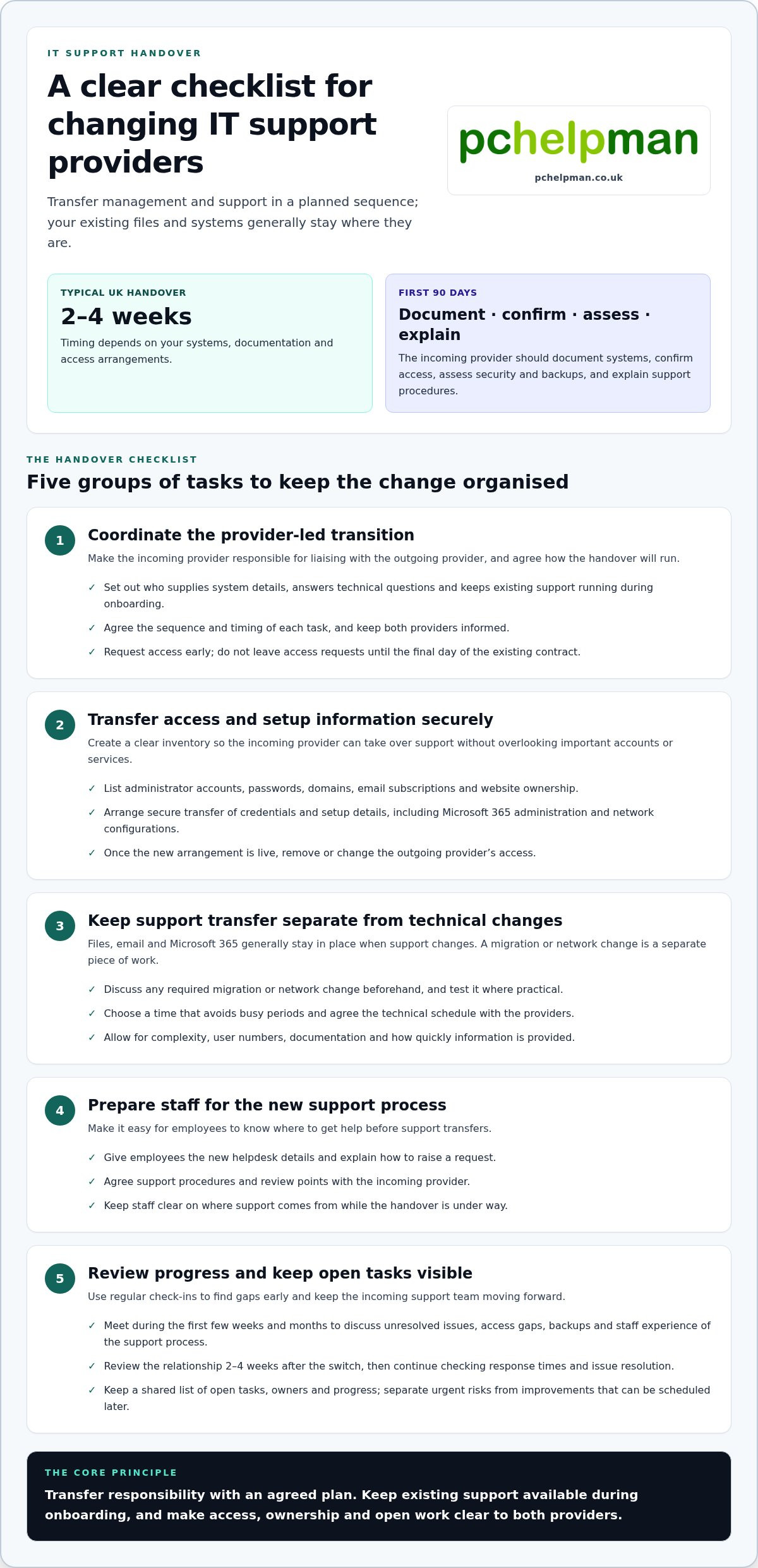
Switching IT support providers usually means transferring the management and support of your existing systems, not moving your business data. A typical UK business handover takes two to four weeks, although timing depends on your systems, documentation and access arrangements. A planned overlap gives the incoming provider time to understand your setup while your existing support remains available.
It’s understandable to delay switching your IT support provider if you’re concerned about losing access, disrupting staff or being caught by contract terms. A clear plan makes the change more manageable. Review your contract, protect data and accounts, organise the handover and prepare your team, so you can approach the switch with fewer surprises.
Key Takeaways
- Map who controls your domain, email, website and administrator accounts, then coordinate access and data migration across the handover.
- Review your contract for notice periods, exit clauses and required written notice before scheduling the change.
- Plan the cutover to keep support clear for staff. According to the Department for Science, Innovation and Technology, 43% of UK businesses identified a cyber breach or attack in the 12 months covered by the Cyber Security Breaches Survey 2025.
- Gather historical tickets, system documentation and configuration details, and agree how the incoming team will receive them.
- According to the European Union, GDPR enforcement was due to come into place on 25th May 2018. Use the transition to make data access and responsibilities clear.
What happens to my data when I switch providers?
Your files, email and Microsoft 365 environment generally stay where they are. The handover usually transfers system management and support, rather than moving your data.
During onboarding and the first 90 days, the incoming provider should document your systems, confirm access, assess security and backups, and explain support procedures. Agree review points so staff know where to get help.
-
Coordinate the provider-led transition
Agree a transition plan that makes the incoming provider responsible for liaising with the outgoing provider. Set out who will supply system details, answer technical questions and keep existing support running during onboarding. Keep both providers informed about the sequence and timing of each handover task. Don’t leave access requests until the final day of the existing contract.
-
Transfer access and setup information
Prepare an inventory of administrator accounts, passwords, domains, email subscriptions and website ownership. Arrange secure transfer of credentials and setup information, including Microsoft 365 administration and network configurations. The incoming provider needs enough access to take over support; remove or change the outgoing provider’s access when the new arrangement is live. According to the European Union, GDPR enforcement was due to come into place on 25th May 2018.
- Schedule technical changes separately from the transfer of support. Email, cloud applications and file storage can often remain in place while the incoming provider checks access and documentation. If a migration or network change is needed, discuss it beforehand, test it where practical and choose a time that avoids busy periods. The schedule depends on complexity, user numbers, documentation and how quickly information is provided.
-
Review the transition and support staff
Set review meetings with the incoming provider during the first few weeks and months. At each meeting, discuss unresolved issues, access gaps, backups and how staff are using the support process. Review the relationship 2-4 weeks after the switch, then continue checking response times and issue resolution. Give employees the new helpdesk details and explain how to raise a request before support transfers.
- Keep managed support moving forward after the handover by recording recurring faults and assigning clear next steps. Ask the incoming provider to separate urgent risks from improvements that can be scheduled later. For example, a missing administrator account needs attention before routine software changes. Keep a shared list of open tasks, owners and progress, so your team can track what remains without relying on informal updates.
Reviewing the existing contract and notice period
Read the current agreement before setting a switch date. Notice terms, renewal dates and exit conditions shape the handover plan.
- Find the signed contract, later amendments and any service schedules. Mark the start date, renewal date, notice period and required notice method. IT support agreements may require 30 to 90 days’ notice, and some run for 12 months or longer. Record each date in your transition plan, then work backwards to set a realistic handover schedule.
- Check the exit clauses as well as the headline notice period. Look for requirements on written notice, outstanding invoices, equipment, software subscriptions and handover assistance. Bring invoices up to date and list items owned or managed by the provider. Identify who controls your domain, email subscriptions and network services, so these aren’t overlooked when support changes.
- Check for automatic renewal and calculate the final date for giving notice. A missed deadline can have consequences if an agreement renews for a further term. Compare the required notice period with the renewal date, not just your preferred switch date. Keep a dated copy of your notice and record when it was sent.
- Find out whether you can leave during the current term by reading the termination and break clauses. Whether you can switch mid-contract depends on the agreement. If early exit is possible, check the process and any termination costs before agreeing a start date with the incoming provider. Otherwise, use the remaining term to prepare documentation, arrange access and agree transition responsibilities.
- Compare the existing commitment with the structure you want next. Some UK agreements run for 12 months or longer, whilst three-month and six-month plans are options businesses may consider. Assess how each term fits your needs, including support requirements as staff, devices or network use change. A support contract can form part of an ongoing support arrangement; align its start with the agreed handover date.
- Send notice only after checking the dates, notice method and incoming transition plan. Treat notice as a scheduled step, not the first move. If the contract requires written notice, use that method and retain a copy. Agree the final support date and the incoming provider’s start date, then check both against the notice period.
Will switching IT support cause downtime for my business?
Usually, no: the handover changes who manages your existing systems, not the systems themselves. Business data generally stays in place, while planned infrastructure changes may involve downtime.
- List the service problems prompting the change and connect each one to a business need. Repeated unresolved faults, slow responses or support that no longer fits hybrid working can signal a mismatch. Other reasons to change may include growth, new software, security concerns or changing employee needs. Compare these issues with your current agreement and identify what the incoming provider should address first.
- Review cybersecurity and hybrid-working requirements before transferring responsibility. The Department for Science, Innovation and Technology reports that 43% of UK businesses identified a cyber breach or attack in the 12 months covered by the Cyber Security Breaches Survey 2025. Use the handover to assess administrator accounts, multi-factor authentication, device security and backups. Include remote access, home-working devices and the software staff use away from the office.
-
Plan infrastructure changes
Separate the support handover from any network, security software or system changes. Ask the incoming provider to identify which tasks affect live services, such as email, file storage or cloud applications. Agree a schedule for each change, outside busy periods where possible, and test migrations or pilot changes before wider deployment. Avoid combining several major changes on the cutover day.
-
Communicate changes to staff
Tell employees and key stakeholders why support is changing, when the new arrangement starts and what they need to do. Before cutover, provide the new helpdesk contact details and explain how to log a request. If the new provider uses a different support process or software, arrange an introduction and share clear instructions. This helps staff avoid sending faults to the previous provider.
-
Plan for continuity during the switch
Agree a continuity plan with both providers, including who handles open incidents and urgent questions during the handover. Keep existing support active while the incoming team checks access and prepares its support processes. Confirm that essential services, such as Microsoft 365 and file storage, remain accessible. Record any planned interruption, its business impact and the steps for resuming work.
- Use the cutover as a defined checkpoint, not a reason to replace everything at once. The incoming provider should distinguish immediate risks from improvements that can be scheduled later. For example, keep current email and network settings stable at first, then plan necessary upgrades separately. Review issues after the switch and give staff a clear route for reporting faults.
Historical data and documentation handover
In the UK, start by agreeing an offboarding plan, collecting system records and coordinating dates with both providers. A typical handover takes two to four weeks, but complexity, documentation and access affect the schedule.
-
Gather historical data and documentation
Ask the outgoing provider for historical support tickets, system documentation and configuration details. Include network diagrams, software information, backup arrangements and known issues, so the incoming team understands how systems work. Check that records describe current settings, not just old project notes. Keep a copy under your organisation’s control and flag gaps that could slow onboarding or complicate support.
-
Coordinate the provider handover
Agree a handover plan with both providers, naming a contact for each task. Ask the incoming provider to request the access information and setup details it needs directly. Keep the outgoing provider involved while questions remain, and agree how open support tickets will be handled. Don’t leave essential requests until the final day, when there may be little time to resolve missing information.
-
Plan the handover timeline
Set dates for information transfer, access checks, staff communications and the support cutover. A typical UK handover takes two to four weeks, although business size, system complexity and documentation affect how quickly it happens. Allow the incoming provider time to review Microsoft 365, devices and network arrangements. Use a short overlap where possible, so questions can be answered whilst the previous provider remains available.
-
Plan a disruption-free handover
Keep existing technology unchanged at first, then schedule improvements separately. Confirm which provider handles incidents during any overlap and how staff should report faults after cutover. Test important access before the handover date, including email and file storage. Agree what happens to outstanding tickets, third-party services and backup records, so changing support doesn’t interrupt daily work.
- Read the current contract for exit duties, notice requirements and possible charges for additional handover work. Agree the scope and timing of any paid work before it begins, and record who supplies each item of information. If a task is delayed, note its owner and revised date in the handover plan. This gives both providers a clear way to resolve unfinished items and track responsibilities.
Reasons businesses delay switching providers
Businesses may postpone a change because the current provider feels familiar, the handover seems complex or service interruptions seem risky. Identify the specific reason for waiting, then turn it into a practical action plan.
- Write down the service problems that prompted the review, using recent examples such as unresolved faults, slow responses or recurring email issues. Compare these with the support your business needs now. A clear reason helps decision-makers distinguish genuine risks from general reluctance and gives the incoming provider a focused starting point.
- Address worries about losing access before they become a reason to delay indefinitely. List who controls administrator accounts, email, domains and website services, then assign an owner to each. An outgoing provider may withhold access information during a difficult handover, or threaten to switch off email without notice. Keep important account details under your organisation’s control.
- Turn uncertainty about disruption into a continuity checklist. Identify business-critical services, such as email, shared files and payment or booking systems, then note who supports each during the change. Agree how staff will report a fault and who will respond while responsibilities transfer. A written process makes the change easier to explain and reduces confusion when an issue arises.
- Separate the decision to switch from the work needed to prepare. For example, you can gather system records and list open support issues before the handover date. This gives the incoming team useful context and helps the current provider answer specific questions. Don’t wait for every improvement to be resolved before planning the change.
- Bring the people affected into the decision early. Ask managers to identify recurring delays, software problems or gaps in remote-working support, then group examples by business impact. Staff input can show whether the current provider’s response meets actual needs. Share the reason for the change and explain where employees can get help after the transition.
- Set a review point instead of letting uncertainty keep the decision open. Record the main service concerns, the handover tasks and the person responsible for each action. If continuity is the main concern, plan business continuity and disaster recovery as part of the change. A defined plan helps decision-makers move forward with clear responsibilities.
PcHelpMan®: Cloud solutions and migration
PcHelpMan® supports businesses planning a provider change with cloud solutions and migration. Cloud work can be planned around your existing systems and handover requirements. Remote and on-site support can help address technical issues during the change, while data recovery and on- and off-site backup solutions can support business continuity planning.
Turn to PcHelpMan® when you need help preparing a cloud migration, maintaining access to business data or organising support around the transition. The next step depends on what your business is moving and the support it needs during the handover.
Contact PcHelpMan® to discuss your transition, or visit pchelpman.co.uk.
Make your next IT support decision with confidence
A provider change is also an opportunity to align technology plans with the way your business works now. Before switching IT support providers, choose an internal contact to keep decisions moving and record priorities for the incoming team. This might mean improving access to cloud tools, arranging support for remote and office-based work, or planning for data recovery needs.
Bring your questions and transition priorities into one conversation. PcHelpMan® can discuss cloud solutions and migration, remote and on-site support, and data recovery in the context of your business. A clear starting point helps make a provider change a considered next step rather than another source of uncertainty.
Discuss your IT switch with PcHelpMan® and take the next step at a pace that suits your plans.
Frequently Asked Questions
Why switching IT provider matters and why do many SMEs reach breaking point?
Changing IT support matters when recurring service problems start affecting everyday work. An SME might reach breaking point after repeated faults go unresolved, staff cannot get clear updates or support no longer matches how the business operates. List examples by business impact, such as work disrupted by email problems. This helps distinguish a temporary frustration from a persistent service gap that needs a lasting response.
What about downtime?
A provider change doesn’t automatically mean your systems or files need to move. An interruption is more likely to relate to a separate technical change, such as replacing security software or changing network settings. Ask for each proposed change to be recorded with the affected service, timing and business impact. A change to email access, for example, needs different preparation from a routine transfer of helpdesk responsibility.
What are the key considerations when switching IT support providers?
Start with the issues you need the new arrangement to solve, then compare them with your current agreement and technology needs. Consider whether the new team can support your existing hardware, software and network, and who controls key technology accounts. Decide how open incidents will be handled and how employees will contact support. These answers help you judge whether the proposed service fits your business.
What if my old IT provider is unhelpful during the transition?
Keep requests specific, written and tied to an agreed handover task. For example, ask for a network configuration file or a named administrator account rather than “all IT information”. Record unanswered requests and tell the incoming provider which details remain outstanding. If access to a service is withheld, you may be able to recover control directly through the relevant technology vendor.
What information do I need to hand over when changing provider?
Prepare a practical picture of how your systems operate. Include a list of devices and users, key software, network arrangements, backup details, open faults and the people responsible for important accounts. Add known workarounds, such as a manual process staff use when a shared folder is unavailable. This context helps the incoming team understand how daily work depends on each system, not just what equipment exists.
Can my old IT provider withhold passwords or my domain?
An outgoing provider may refuse to share access details during a difficult handover, but businesses can usually recover control directly through the relevant vendor. First identify the domain registrar, email platform or other account involved, then locate records showing your organisation’s ownership and billing. Ask the incoming provider to help identify the correct account and recovery route. Avoid sharing credentials through unsecured messages or leaving an account dependent on one person.
How does the handover work?
The handover moves in stages: the business agrees responsibilities, the incoming team reviews the environment, both providers exchange relevant details, and support responsibility transfers. Keep a single task list showing each item, its owner and status. For example, note whether a support ticket is closed, transferred or awaiting information. This gives staff and managers a clear view of progress without relying on separate email threads.
How can I avoid downtime or service interruptions during the switch?
Keep the changeover focused on transferring support, and avoid bundling unrelated upgrades into the same cutover. Identify services staff need continuously, then confirm who handles faults affecting them during the transition. Test access to key systems before the handover and make sure employees know the right support route. If a technical change needs a fallback, agree how to restore the previous configuration before work begins.


