

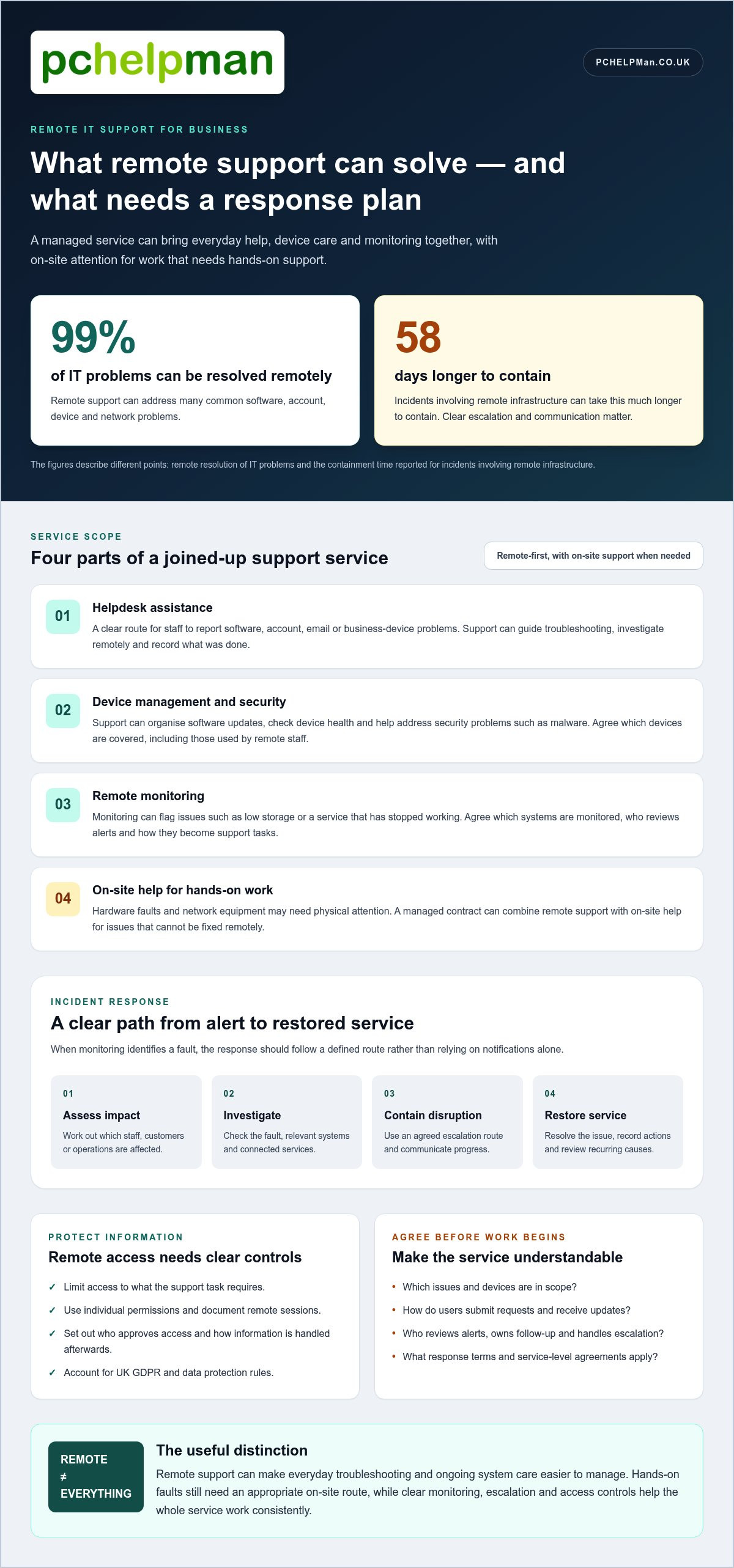
Most small businesses need reliable IT support at some point, but not necessarily a full-time in-house specialist. Remote IT support for business systems can resolve common software, account, device and network problems, and 99% of IT problems can be resolved remotely.
That matters when a technical issue interrupts work, but not every problem can be fixed remotely. Hardware faults and network equipment may need hands-on attention, while remote help can make everyday troubleshooting and ongoing system care easier to manage.
This guide explains when remote IT support for business makes sense, what remote services can cover and how they can fit into a managed contract. You’ll also learn what to look for in a trusted provider, including its approach to security, monitoring and response, so you can choose support that suits the way your team works.
Key Takeaways
- Work out whether recurring technical problems, security concerns or interrupted work call for ongoing support rather than occasional fixes.
- See how a managed support contract can bring helpdesk assistance and device management together.
- Learn which issues remote support can handle and when on-site help may be more appropriate.
- Use clear service-level agreements and response-time terms to assess what support you can expect.
- Compare providers by their approach to monitoring, incident response and protecting business data.
Can remote IT support be included as part of a managed IT support contract?
Yes. A managed IT support contract can include remote helpdesk assistance, device management and monitoring, with on-site support for work that needs hands-on attention.
To assess a provider’s scope, response terms and security approach, watch this practical overview:
End-user service desk support
A helpdesk gives employees a clear route for reporting problems with software, accounts, email or business devices. The support team can guide users through troubleshooting, investigate issues remotely and record what was done. For example, a staff member who can’t access a shared file can report the error instead of asking colleagues to troubleshoot it.
Before agreeing a contract, review how users submit requests, which issues are covered and how updates are communicated. A named support contact or clear helpdesk channel makes it easier to follow an open ticket and provide useful details.
Device management and security
Device management can cover workstations, laptops and other devices used to access the business network. A support team can organise software updates, check device health and help address security problems such as malware. Regular updates can help reduce the risk of attackers exploiting vulnerabilities.
Agree which devices are in scope, including equipment used by remote staff. A practical inventory helps identify who uses each device and which software it needs. Clarify how updates are scheduled so they fit business operations and don’t interrupt essential work.
Remote monitoring software
Remote monitoring and management software lets a support team check connected devices and network systems from a distance. It can flag issues such as low storage or a service that has stopped working, giving technicians information to investigate before a user has to describe every technical detail.
Ask which systems are monitored, who reviews alerts and how issues are recorded. Monitoring software supports the process, but doesn’t replace clear ownership. The agreement should explain how alerts become support tasks and how staff are told about problems affecting their work.
Data protection for remote support
UK GDPR and data protection rules matter when remote support could expose personal information on screens, in files or in system logs. Limit access to what the support task requires, use individual permissions and document how remote sessions are managed.
Set out who can approve access, how support activity is recorded and how information is handled after a session. Clear controls help protect staff and customer data while allowing technicians to resolve software or network faults.
A managed contract should identify the account contact, the route for routine requests and the escalation path for a serious disruption. For example, staff may report everyday software faults through the helpdesk, while a network outage follows a defined escalation process. Agree how progress updates are shared and how recurring problems are reviewed. These details connect monitoring, device care and end-user support into a service your team can use consistently.
Proactive monitoring and incident response
Proactive monitoring looks for warning signs before they interrupt work. A clear incident process then helps teams contain problems, restore services and protect productivity.
System monitoring and maintenance
Monitoring can track whether servers, cloud services, network connections and business applications are working as expected. For example, a rising storage alert gives technicians time to investigate before employees lose access to shared files. Routine maintenance includes reviewing system health and addressing alerts, rather than waiting for a user to report a fault.
Ask which systems are monitored, how often alerts are reviewed and who owns follow-up. These details show whether monitoring leads to action. A useful service report can record the alert, investigation, resolution and any recurring cause, helping the business see where maintenance is needed.
Proactive issue resolution
When monitoring identifies a fault, the response should follow a defined path: assess its impact, investigate the cause, contain disruption and restore the affected service. For example, if a business application stops responding, support can check the service and related network connections before deciding whether users need a workaround.
Incidents involving remote infrastructure can take 58 days longer to contain. This makes clear escalation, access to technical records and agreed communication especially important. Ask how the support team separates routine alerts from incidents affecting staff, customers or essential operations.
Good monitoring is more than a stream of notifications. Systems need sensible thresholds so a minor warning doesn’t obscure a serious fault. For example, repeated failed backups deserve investigation because later data loss may leave the business without a usable recovery point. Agree which alerts trigger action, who receives updates and how unresolved problems are escalated.
Incident response also depends on preparation. Keep an up-to-date record of key systems, service owners and dependencies, such as which applications rely on a particular network connection. If email or file access fails, that information can help technicians focus their investigation. A written incident log also captures decisions and supports a review after service is restored.
Backups and disaster recovery planning complement monitoring by preparing for data loss or wider outages. Check that backup status is reviewed and recovery steps are documented, not simply assumed. The right process depends on the services your business relies on and how disruption affects staff and customers.
For ongoing system oversight, remote monitoring and management can support maintenance and incident handling as part of a planned support arrangement.
Do small businesses need IT support?
IT support helps small firms reduce downtime, protect systems and get help when faults interrupt work. Remote support suits software and account issues, while damaged hardware or failed network equipment may need an on-site specialist.
For many small businesses, remote support is a practical alternative to employing an in-house team. Its limits include reliance on internet access and the inability to repair physical faults remotely.
Remote helpdesk and on-site coverage
A remote-first helpdesk gives staff a route to report problems across one office or several sites. Support teams can help with software, email and account access without travelling to each workplace. In the UK, over 99% of businesses are small and medium-sized enterprises, so support needs can range from one shared office to teams spread across locations.
Check how staff report faults and how support handles issues affecting multiple sites. For example, a shared network problem may need coordinated troubleshooting rather than separate requests from each office.
When on-site support is needed
Remote assistance can’t replace physical work. A broken laptop screen, damaged cabling or a router that needs replacing requires someone to handle the equipment. On-site visits can also help with office moves, network installations or faults that remain after remote troubleshooting.
Coverage depends on the support arrangement, including the locations served, the work included and how visits are scheduled. Set out these details in the agreement, alongside the escalation route for a disruption affecting an entire office.
Remote support versus an in-house team
An in-house IT employee works directly with the business and can provide hands-on help at its premises. Remote support gives a small firm access to a helpdesk and technical assistance without employing its own specialist. The better fit depends on daily support needs, internal expertise and how much equipment requires physical attention.
Remote support can often address software and access issues, making it suitable for many such problems. An in-house team may be more practical when frequent hands-on work or close day-to-day coordination is central to operations.
Consider the cost of downtime as well as the type of fault. If staff can’t access cloud software, remote troubleshooting may restore productivity without a site visit. If a device has a physical fault, remote guidance can help diagnose the issue, but a repair still requires hands-on work.
Remote access also depends on a working internet connection and secure access to the affected system. A site-wide connectivity outage can prevent remote assistance from reaching devices. For businesses with multiple sites, document who reports incidents, which location is affected and how the support team shares updates during disruption.
Before choosing a model, list recurring problems, essential systems and situations that need a visit. Then match those needs to helpdesk access, on-site coverage and agreed support arrangements. This gives a small business a clearer basis for deciding whether external support, an in-house specialist or a combination best fits its operations.
How can I find a remote IT service provider that I can trust?
Look for clear service levels, defined support services and a response process matched to your business priorities. To switch providers in the UK, document your current systems and support needs, agree the new scope, then plan access and handover before the service starts.
Service levels and response times
A service-level agreement (SLA) should explain how support handles incidents, which response times apply and how progress is communicated. Check whether the terms distinguish a minor software fault from a server outage that stops work. For a serious outage, businesses might expect a response within 15-30 minutes.
Response time means how soon support acknowledges a request, not how soon the issue is resolved. An SLA might use 99.9% as an example uptime commitment. Treat that figure as a term to understand, not a measure of every support service. Check what systems it covers and how performance is reported.
Defining the support services
Write down the systems your team relies on, such as email, cloud applications, laptops and the business network. Then define which support services cover each area. A clear scope helps you assess whether a provider can resolve software faults, manage devices or escalate a hardware issue that needs hands-on work.
Also agree how employees contact the helpdesk, who can raise requests and how urgent incidents are classified. For example, one employee unable to access an application is different from a whole team losing access. Clear definitions help support staff prioritise disruption and give employees a consistent route to assistance.
Before changing providers, list current systems, users, open support issues and important access arrangements. Agree a handover plan covering account permissions, records and active incidents. Set a start date that lets the incoming team understand the environment before the previous arrangement ends.
During the transition, assign an internal contact to coordinate questions and share accurate system information. Test the new request route with a routine issue, such as a password or software problem. Confirm that staff know where to report faults and how they’ll receive updates. This practical step can expose gaps before a serious incident occurs.
Finally, review service reports against the agreed SLA. Look for patterns, including repeated faults, slow acknowledgement or unclear ownership. Regular reviews give both sides a chance to refine priorities, adjust support coverage and focus on reducing disruption to essential work.
Choosing a trusted remote IT provider
UK businesses can compare providers by their service scope, security practices, communication and ability to support their infrastructure. Match these details to your team’s locations, essential systems and day-to-day priorities.
Local or national IT support
A local provider may suit a business that needs remote help alongside visits to nearby premises. A national provider may suit organisations with sites across the UK and support needs spread across regions. Compare each model with your locations, required on-site work and the route staff use for everyday assistance.
For example, a business with offices in different towns needs clear coverage for every site, not just its main office. Check how remote requests and on-site tasks fit together, and whether the arrangement reflects where your staff and equipment are based.
Selecting an IT support partner
A reliable partner should make responsibilities clear, from routine software assistance to incidents affecting the whole network. Review how support records requests, shares progress and identifies recurring faults. These details help you understand who owns each issue and how the service supports staff as they run the business.
Security deserves equal attention. Look for robust data security practices and compliance with relevant data protection laws. Consider how remote access is controlled and how support activity involving customer information is handled. Clear, documented processes help protect sensitive business data.
Choosing a provider for a UK business
Start with a practical inventory of users, devices, cloud services, network infrastructure and locations. Then compare it with the support scope, including helpdesk access, monitoring, security and any on-site work. This makes gaps visible before an agreement begins, such as a branch or business application without a defined support route.
Review the service-level agreement alongside the service description. Check how incidents are prioritised, what response means and how updates reach employees. A server outage and one user’s software problem have different effects on the business, so the process should distinguish their urgency.
Look for regular service reviews covering open issues, repeated faults and planned changes. For instance, if staff repeatedly lose access to a shared application, a review should identify the pattern and agree follow-up actions. This helps assess whether the support partner is reducing disruption, not simply closing individual requests.
Before committing, map the transition: identify system records, access arrangements, current issues and the person coordinating the handover. A planned changeover helps the new team understand the infrastructure and gives employees a clear support route from the start.
For a tailored discussion about business support needs, contact PcHelpMan® about IT support.
PcHelpMan®: Cloud solutions and migration
PcHelpMan® can help if your business is planning a cloud move or needs practical IT support. Cloud solutions and migration can support a planned change, while remote and on-site support helps address technical issues affecting your team.
Before a migration, identify the files, applications and working practices your team relies on. This gives the project a clear starting point and helps shape the move around daily operations. If data has been lost, data recovery can help address that separate problem. On- and off-site backup solutions can also support a considered approach to protecting business data.
For small teams, the right next step may be discussing a cloud migration, support need or backup approach. Contact PcHelpMan® to talk through what your business needs.
Take the next step towards dependable IT
Choosing remote IT support for business operations is about more than fixing the next technical fault. It’s an opportunity to shape support around how your team works, the systems it relies on and the changes you’re planning. Start by identifying a practical priority, such as moving services to the cloud, supporting remote and office-based work, or addressing lost data.
PcHelpMan® supports these needs with cloud solutions and migration, remote and on-site support, and data recovery. A conversation about your current setup can help clarify the next step, whether you’re planning a change or dealing with an IT issue that’s affecting work.
Contact PcHelpMan® about remote IT support to discuss the support your business needs. A clear starting point can make your next technology decision feel much more manageable.
Frequently Asked Questions
What issues can be resolved remotely?
Remote support can address many software, account, email and connectivity faults without a technician handling the device. For example, a technician can guide a user through an application error or investigate why a workstation can’t reach a shared folder. Remote diagnosis can also show whether a problem needs physical repair, giving staff a clearer next step when a laptop or network component is faulty.
Can remote IT support help hybrid workers?
Yes. Remote assistance can help employees working from home or the office with access, software and device issues. For example, a staff member who can’t connect to a work application can get help without travelling to the workplace. PcHelpMan® provides remote and on-site support, so teams can use remote help for suitable issues and arrange hands-on assistance when a problem involves equipment.
Do you offer support for cloud-based tools?
Yes. PcHelpMan® provides cloud solutions and migration, including Google Workspace and Microsoft 365 setup and migration. Support can be useful when a business is moving email or shared working tools, or adapting its digital workspace. For example, planning a migration means considering which services employees use and how they collaborate, so the move fits established working practices.
How can remote IT solutions help businesses?
Remote IT solutions let technical staff investigate and resolve suitable faults without travelling to the user’s workplace. This can help keep work moving when an employee has trouble with software, email or access to shared resources. For example, resolving an account issue remotely can let a staff member resume work from home, while a physical device fault may still need in-person attention.
How do you provide remote technical assistance?
PcHelpMan® provides remote assistance via TeamViewer. The user and technician can work through a technical issue on the affected computer, such as software behaviour or an error message. For a useful session, describe what happened, what you were doing and any message on screen. If the fault needs physical handling, remote diagnosis can help identify the next step, including booked on-site support.
How does IT support help with data backup and disaster recovery?
IT support can help set up on-site and off-site backups, then plan how the business would restore data after loss or disruption. For example, a recovery plan can identify which files staff need first and where backup copies are stored. PcHelpMan® provides backup solutions and business continuity planning, as well as data recovery for problems involving lost or inaccessible information.
What services does remote IT support for businesses include?
Business support can include helpdesk assistance, hardware and software troubleshooting, remote monitoring and management, network support, cybersecurity, cloud services and backup planning. The right combination depends on the systems your team relies on. For instance, a business using cloud collaboration tools may need migration support, while one with recurring device faults may prioritise technical troubleshooting and ongoing maintenance.
What response times and service levels should a UK business expect from remote IT support?
Response times depend on the support agreement, how it classifies incidents and the service level attached to each priority. Read the terms to understand the difference between acknowledgement, active investigation and resolution. For example, a problem affecting one user may have a different priority from an outage preventing a whole team from working. Check how progress is communicated and how issues are escalated.


