

A small technical issue can quickly interrupt the working day. For businesses looking for IT support in Brighton, managed support brings helpdesk assistance, system maintenance, cybersecurity, backups and network support together, helping remote staff stay connected to the tools they need.
It’s frustrating when a slow system, access problem or unexpected fault pulls people away from work. Practical support can help with everyday issues and prevent avoidable disruption, so your team doesn’t have to untangle technical problems alone.
This article explains how managed IT support can help Brighton and Hove businesses with remote working, system problems, cybersecurity and day-to-day technical issues. You’ll learn what support can include, how to assess your business needs and what to consider when choosing a local service.
Key Takeaways
- Managed support can bring helpdesk assistance, system maintenance, cybersecurity and backup planning into a more coordinated approach.
- Remote and hybrid teams benefit when access, devices and connectivity are supported across both home and office working.
- Slow computers and recurring errors are easier to address when symptoms are recorded and checked systematically.
- Compare support options by how they handle everyday queries, cybersecurity, system monitoring and your organisation’s needs.
- For ongoing issues with cloud systems, support or backups, learn how tailored technical help can fit your working setup.
Managed IT support for Brighton and Hove businesses
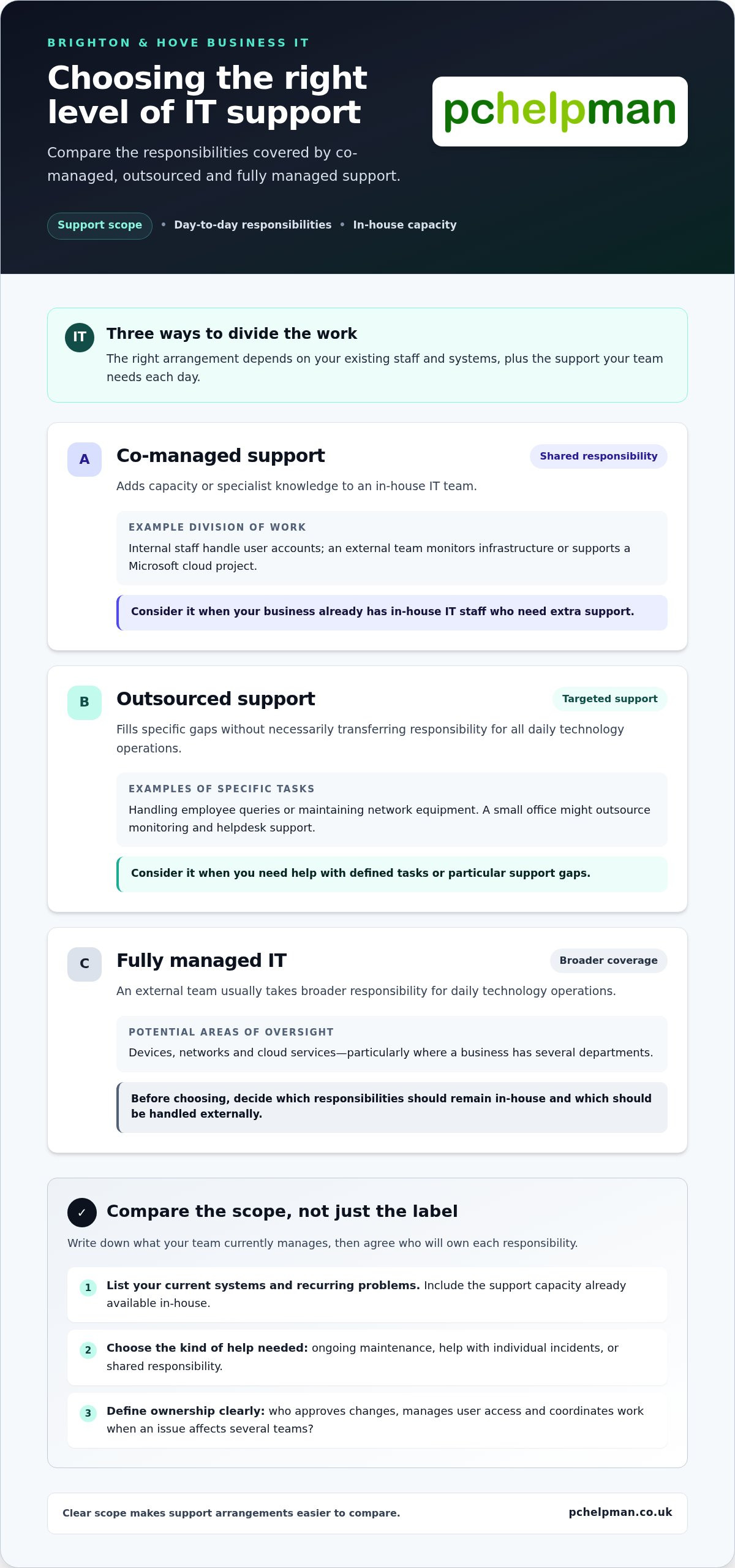
For businesses seeking IT support in Brighton, managed services combine ongoing system care with practical help when problems arise. The right arrangement depends on your existing staff and systems, and the support your team needs each day.
For an overview of managed service providers, watch this video from David Papp:
Managed IT Services and Monitoring
Managed IT services cover routine work that keeps business technology running, including system maintenance and remote monitoring. Monitoring can flag issues such as low device storage before staff lose access to files. Ask which systems are monitored, how alerts are handled and what maintenance is included. A local provider can also visit your office to assess its setup and tailor advice.
Co-managed support can suit a business with an in-house IT team that needs extra capacity or specialist knowledge. For example, internal staff might handle user accounts whilst an external team monitors infrastructure or supports a Microsoft cloud project. Microsoft surveyed over 1200 companies about their cloud goals and challenges for 2023, reflecting the planning involved in cloud decisions.
Managed IT Support and Helpdesk
A helpdesk gives employees a clear way to report faults, request access or get software help. For example, a new starter who cannot sign in can raise a support request instead of interrupting several colleagues. Check how users submit requests, what information the support team needs and how it shares updates. This helps staff know what to expect after reporting a problem.
Technical support can cover hardware and software issues, from a faulty laptop to an email application error. A useful process records the device, error message and recent changes before assigning the issue for diagnosis. Helpdesk and end-user support can also guide staff through routine tasks, reducing confusion when tools or working practices change.
Outsourced and Fully Managed IT
Outsourced support can fill specific gaps, such as handling employee queries or maintaining network equipment. Fully managed IT usually gives an external team broader responsibility for daily technology operations. Before choosing, list the systems and tasks your staff currently manage, then decide which responsibilities should remain in-house.
A small office might outsource monitoring and helpdesk support while keeping technology decisions in-house. A business with several departments may need broader oversight of devices, networks and cloud services. Define who approves changes, manages user access and coordinates work when an issue affects several teams.
To compare support options, record your current systems, recurring problems and in-house support capacity. Then decide whether you need ongoing maintenance, help with individual incidents or shared responsibility with internal staff. A clear scope makes it easier to compare arrangements and understand which everyday tasks each one covers.
Do you support hybrid and remote workers?
Yes. Remote support helps staff resolve technical problems whether they work from home, at a Brighton office or at another site. The arrangement should cover secure access, user permissions, device maintenance and a clear way to report faults.
Support for Multi-site and Remote Teams
A team split between Brighton and another office needs consistent access to shared files, applications and communication tools. For example, staff using Microsoft 365 should be able to sign in, reach approved documents and join meetings from their assigned devices. Support can also help diagnose whether a fault affects one worker, one location or the whole organisation.
Before setting up remote access, map the people, devices and systems that need to connect. Give each worker access only to the files and services their role requires. Encrypted connections, individual accounts and prompt removal of access when someone leaves help reduce exposure to threats. Shared logins make it harder to trace unusual activity or limit access appropriately.
Ongoing Remote Support and Maintenance
Ongoing remote support can help keep business devices and services running smoothly without requiring staff to bring every computer into an office. A technician can guide a user through a software issue, review system alerts or investigate a connection problem remotely. For example, recording the device name, error message and time of a failed Microsoft 365 sign-in gives support useful details.
Maintenance should reflect how each team works. A laptop used daily for customer calls has different priorities from a shared office printer. Agree which devices and services are covered, how planned changes are communicated and how staff report new problems. Reliable IT support also distinguishes a fault affecting one user from an issue across several locations.
Remote Support Response Times
Support arrangements should explain when a request is acknowledged, how it is prioritised and what happens if remote troubleshooting does not resolve it. A staff member unable to access essential files may need a different priority from someone requesting a routine software change. Ask how business impact, affected users and available workarounds determine ticket priority.
Response time and resolution time are different measures. A quick acknowledgement confirms that a request is logged, but diagnosis or repair may take longer if the cause involves a network, device or external service. Set out the support hours, escalation route and update process in writing, so a remote worker knows what to do during an outage. For help with remote IT support, use the contact options provided on this site.
Slow computer and system error fixes
A slow computer can have several causes, so effective support starts with diagnosis rather than guesswork. Note which device is affected, when the slowdown began and what task was running. If one laptop stalls while opening a spreadsheet but colleagues’ devices work normally, the fault may be local rather than network-wide. That distinction helps narrow down the next checks.
A technician can review available storage, running applications, error messages and network access. They can also check whether a recent software change coincided with the problem. Record the exact error text and any steps that reproduce it, such as opening a particular file or joining a video call. These details make support more efficient and help distinguish a device fault from an application or connection issue.
Practical troubleshooting follows a clear sequence: save your work, note the symptoms, restart only when appropriate, then report what changed. Avoid repeatedly deleting files or changing settings without understanding the cause. If several staff experience the same error, include their locations and affected services in the report. This pattern may point to shared software, network equipment or a business system rather than separate computer faults.
System maintenance, updates and cyber security
Planned maintenance helps keep devices and business applications dependable. Updates can address software problems, but timing matters when staff rely on a system throughout the working day. Identify which devices use the application, arrange a suitable maintenance window and test essential tasks afterwards. Proactive monitoring can also flag recurring faults, such as a device repeatedly running short of storage.
Maintenance involves more than installing updates. Reviewing user access, checking backup processes and removing unwanted software can help reduce exposure to cyber threats. If a computer behaves unusually after an unexpected attachment is opened, stop using it for sensitive work and report the symptoms promptly. Cybersecurity support can investigate possible malware and help protect connected systems.
Telecoms and VoIP phone systems
Phone problems can resemble computer faults, especially when a business uses VoIP over its internet connection. If calls drop while email still works, record whether the issue affects one handset, one office or every user. Check that the handset has power and a secure network connection, then note any error message before reporting it.
A business phone system also relies on clear call routing, user settings and network performance. For example, a new starter may need an extension and call handling configured alongside computer access. Support can investigate handset faults, call quality and configuration, while network troubleshooting can help identify whether the cause lies with a device or the wider connection.
To keep work moving, report the impact as well as the symptom: explain whether staff cannot make calls, access files or use a key application. A clear description helps prioritise investigation and determine whether remote checks or an on-site assessment is more suitable. Recording recurring errors also shows whether a one-off repair solved the issue or the underlying fault remains.
Do you provide cyber security protection for Brighton companies?
Yes. IT support companies serving Brighton and Hove can provide cybersecurity alongside monitoring, maintenance, backups and helpdesk support. The UK government’s Cyber Security Breaches Survey reports that many small businesses face cyber attacks each year, making practical protection an important part of business support.
Providers differ in what they do, so compare the work each service covers. One may focus on network security and malware removal, while another combines those services with managed IT, backup planning and user support. A flexible arrangement can suit a business that needs help with specific systems; a fully managed service can take on more day-to-day responsibility.
Look for a clear approach to proactive monitoring, security updates and investigating unusual activity. For example, a provider should explain how a suspicious sign-in is reported, assessed and escalated. Ask how staff can report a suspicious email and whether the service includes Cyber Essentials certification or support with Cyber Essentials compliance. These details show how security fits into everyday support.
Which IT support companies serve Brighton and Hove? Local and regional providers support businesses across the area, with different service models and technical strengths. Compare their services with your systems, in-house skills and preferred balance of remote and on-site support.
A good fit matters as much as the service list. A business with an internal IT lead may need help with specialist security tasks or monitoring. A smaller organisation without dedicated IT staff may prefer helpdesk support and broader ongoing maintenance. Consider how support needs may change as staff, devices and locations change.
Changing providers requires a careful handover. Start by listing business devices, cloud accounts, network equipment, backups and key suppliers. Agree who will transfer administrator access, document system settings and resolve open support requests. For example, a Microsoft account transition should include a clear record of users and permissions, so staff retain appropriate access.
During onboarding, give the new support team an accurate picture of your setup. Share device records, software details, known issues and existing security procedures. Then agree priorities, reporting routes and who approves system changes. A staged handover helps staff know where to report a problem while support responsibilities transfer.
Finally, agree how progress will be reviewed. Regular discussions about incidents, recurring faults and planned changes help a provider adapt support as your business develops. Clear responsibilities and a documented onboarding plan make it easier to judge whether the arrangement remains suitable.
Day-to-day troubleshooting and technical support
Everyday faults can interrupt work without taking an entire business offline. A staff member might lose email access, struggle with a printer or find a shared folder missing. Managed IT support gives employees a way to report these problems and helps identify whether the cause lies with a device, application or network.
A useful support request describes both the symptom and its impact. Note the affected device, error message and what happened just before the fault. For example, “the finance laptop cannot open the shared folder after reconnecting to Wi-Fi” gives a technician more to investigate than “the computer is broken”. Screenshots can clarify unfamiliar messages.
For a consistent handover, employees can include:
- The device name and the person using it.
- The application, file or network service affected.
- The exact error text and when it appeared.
- Any recent change, such as a password reset or software installation.
These details help the support team reproduce the issue and decide what to check first. If several colleagues report the same problem, include their devices and work locations. A shared fault may point to a network connection or business application; one affected laptop may need device-specific troubleshooting.
Good technical support also keeps users informed during diagnosis. A technician might ask an employee to test another browser, reconnect to the office network or check whether a file opens on another device. Each check should narrow down the cause, not introduce unrelated changes. Record the result so the next person handling the request can continue without starting again.
Reliable support addresses both the immediate fault and its recurring causes. If a printer repeatedly disconnects, for example, the investigation should consider its connection and configuration, not just reconnect it each time. Network troubleshooting can help distinguish a local device fault from a wider connection issue, supporting productivity and smoother-running business systems.
Some requests need remote guidance, while hardware faults or office network issues may call for on-site attention. Clear ticket notes help the support team choose the right approach. A practical process also explains how staff report a problem, receive updates and know when they can resume the affected task.
For help with recurring hardware, software or network problems, explore technical support services and find a practical route to resolving day-to-day issues.
PcHelpMan®: Cloud solutions and migration
PcHelpMan® helps businesses in Brighton and Hove plan cloud solutions and migrations around their existing systems and working needs. If your team is moving files or services to the cloud, a considered migration can help organise the transition and maintain access to essential information.
PcHelpMan® provides remote and on-site support for technical issues during day-to-day work. On-site and off-site backup solutions can support your approach to protecting business data, while data recovery can help when files become inaccessible. The right combination depends on your systems, the information your team relies on and how staff need to access it.
If you’re planning a cloud migration or need help with backups, data recovery or technical issues, contact PcHelpMan® to discuss your requirements.
Make your next IT decision with confidence
Start by deciding what better support should make easier for your team. You might want fewer interruptions during routine work, a clearer way to handle recurring faults or help planning a cloud migration. These priorities give any conversation about IT support in Brighton a practical starting point grounded in how your business works.
PcHelpMan® helps with cloud solutions and migration, remote and on-site support, and data recovery. Identify the issue affecting your staff most, then outline the systems and tasks involved. A focused discussion can help you explore an appropriate next step without turning it into a larger project than you need.
Contact PcHelpMan® about IT support to discuss what your business needs. A clear plan can help your people approach everyday technology with greater confidence.
Frequently Asked Questions
Looking for reliable IT support in Brighton?
For reliable IT support in Brighton, look for a service that fits your working setup and gives staff a clear way to get help. PcHelpMan® supports businesses in Brighton and Hove with managed IT services and technical support. Before discussing support, note your main pain points, such as repeated email access problems, ageing equipment or difficulty managing technology across office and home working.
Do I need to pay for a support contract?
PcHelpMan® provides ongoing managed support through support contracts, which set out the agreed service and responsibilities. Whether a contract suits you depends on your business’s support needs. If you mainly need help with a particular project or technical issue, describe the work required and request a quote. For continuing support, consider which systems and users need coverage, and how responsibilities should be shared.
Do you offer backup and disaster recovery?
Yes. PcHelpMan® provides on-site and off-site backup solutions, business continuity planning and disaster recovery. Backups can form part of a plan to restore important information after data loss or system disruption. Identify which files your business relies on, where they are stored and who needs access. PcHelpMan® also provides data recovery when storage media or files become inaccessible.
Do you offer on-site visits in Brighton and Hove?
Yes. PcHelpMan® provides booked on-site support in Brighton and Hove, as well as remote assistance. An office visit can help with issues that benefit from seeing the equipment or workspace directly, such as workstation setup or a physical connection problem. When arranging support, describe the affected equipment, its location and the issue so the visit can be planned around the work needed.
How fast is your response time for Brighton support issues?
Response arrangements depend on the support agreement and the priority assigned to the issue. A fault affecting several users’ access to a core business system may need different handling from a routine software query. PcHelpMan® provides scheduled support, rather than 24/7 emergency callouts. Include the business impact and affected users when reporting an issue, so its urgency is clear.
How quickly do you respond to support requests?
There isn’t one response time for every request; the agreed support arrangements and issue priority shape what happens next. PcHelpMan® provides scheduled remote assistance and booked on-site visits, not same-day repair turnarounds. To help support staff assess a request, describe what you were doing, the exact message shown and whether the issue affects one person or several colleagues.
What IT support services are available in Brighton?
PcHelpMan® provides managed IT services, helpdesk support, hardware and software troubleshooting, network maintenance and cybersecurity support. Businesses can also arrange cloud migration, Wi-Fi and VoIP work, data recovery and backup solutions. For example, a company moving offices may need its connectivity and phone systems considered alongside user devices. The right mix depends on your existing systems and the support gaps you want to address.
How much does IT support cost in Brighton for businesses?
The price depends on the work and is provided after a quote request. Cost factors include the support required, the number and type of systems involved, the work’s complexity and whether support is ongoing or project-based. A defined technical task differs from a managed support arrangement covering business systems. Describe your current setup and priorities to help scope the work.


