

A backup is only useful if you can restore from it. To protect business data from loss, keep regular, secure backups and test that they work. The 3-2-1 rule is a practical starting point: keep three copies of your data on two types of media, with one copy stored offsite.
It’s understandable to think of data loss prevention as stopping information from being shared or accessed without permission. That matters, but business continuity also depends on recovering data after accidental deletion, hardware failure, a cyberattack or a disruption to your premises.
This article explains how backups, professional data recovery and business continuity planning can reduce disruption. You’ll also learn how an assessment can reveal gaps in your current arrangements, so you can make practical improvements and be better prepared to restore essential data when something goes wrong.
Key Takeaways
- Use the 3-2-1 backup rule as a starting point, and test restores so you know your copies are usable.
- Match recovery steps to the data and systems your business needs to keep operating.
- Spot risks such as accidental deletion, hardware failure and cyberattacks, then address the gaps in your current safeguards.
- Set backup frequency around how often important data changes, and retain copies only as long as they’re needed.
- Compare cloud backup and disaster recovery options by considering security, access and how they support business continuity.
1. Backup and professional recovery options
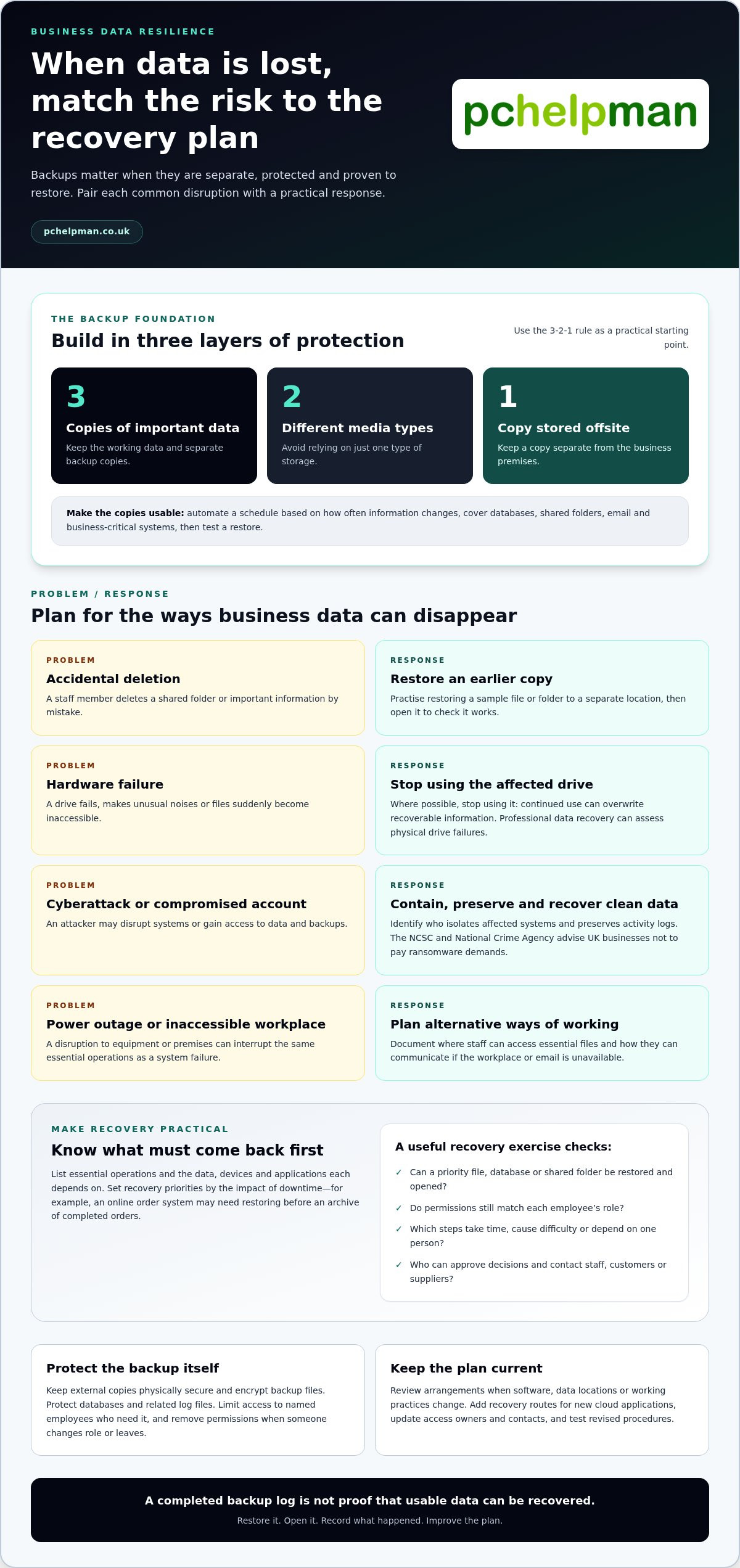
A practical way to protect business data from loss is to combine routine backups with recovery tests. The 3-2-1 rule offers a useful structure: keep three copies of important data, on two different types of media, with one copy stored offsite. For example, retain working files, a separate backup and an offsite copy.
Set a backup schedule based on how often information changes and how much work your business could recreate. A business processing orders throughout the day may need more frequent backups than one updating a small set of records weekly. Automate the schedule where possible, then check that it covers databases, shared folders, email and business-critical systems.
Test recovery, not just the backup status. Restore a sample file to a separate location and open it to confirm it works. For a larger check, practise restoring a database or shared folder, then record how long it takes and which steps cause difficulty. A completed backup log alone doesn’t prove that usable data can be recovered.
Keep an external copy physically secure, such as in a lockable container, and encrypt backup files. Protect databases and their related log files too. Limit access to named employees who need it, and remove permissions when someone changes role or leaves. These steps help reduce exposure if a device is lost or an account is compromised.
For the UK GDPR requirements for business data security, backups and recovery, businesses must secure personal data and follow data protection principles. UK data protection law includes the Data Protection Act 2018, according to The National Archives. A backup supports availability, but it doesn’t replace careful handling, access controls, security policies or a plan to respond to a threat.
Outdated or ad hoc copies can leave gaps. Check which data each system holds, who can restore it and whether the recovery copy is separate from the original. If a drive makes unusual noises or files suddenly become inaccessible, stop using it where possible. Continued use can overwrite recoverable information. Professional data recovery can assess physical drive failures.
How much do business data backup services cost in the UK? The price depends on the case and is given after a quote request; storage capacity, retention needs, systems covered and recovery requirements shape the cost.
To protect business data from loss caused by hardware failure, human error or cyberattacks, combine separate backups with tested restores, controlled access and clear staff procedures. For example, an employee who deletes a shared folder should be able to restore an earlier copy, while a compromised account shouldn’t have unrestricted access to backups.
Review the backup schedule whenever software, data locations or working practices change. An assessment can reveal unprotected devices, missed cloud accounts and recovery steps that depend on one person. Address those gaps, document who responds and test the revised process so recovery is practical, not just planned.
2. Data recovery and business continuity
A recovery plan turns backup copies into a workable response when systems fail. Start by listing essential operations, such as processing orders, accessing customer records and paying staff. For each operation, identify the data, devices and applications it depends on. This clarifies priorities if a disruption affects several systems at once.
To create and test a data recovery plan, assign roles, document recovery steps and identify who can approve decisions. Include disaster recovery and business continuity arrangements, then practise restoring a priority system from backup. Record what worked, how long each step took and what needs improving.
Set recovery priorities according to the impact of downtime. An online order system may need restoring before an archive of completed orders. Note which employees can access sensitive information and who can contact staff, customers or suppliers. Keep a printed or securely accessible copy of key contacts in case email is unavailable.
Plan for more than a cyberattack. A power outage, damaged equipment or inaccessible workplace can interrupt the same operation. Document alternative working arrangements, where staff can access essential files and how they can communicate. Include instructions for shutting down or isolating affected devices when continued use could spread damage.
For a suspected ransomware incident, the response plan should identify who isolates affected systems and preserves relevant activity logs. The NCSC and National Crime Agency advise UK businesses not to pay ransomware demands. Record how the business will assess the impact, recover clean data and decide whether affected parties need notification under applicable obligations.
Recovery testing should resemble real work, not just a technical check. Restore a sample folder, open key files and confirm permissions still suit each employee’s role. For a larger exercise, simulate losing access to a shared system and follow the documented process. Note missing passwords, unclear responsibilities or steps that rely on one person.
After a real incident or practice exercise, update the plan. If a new cloud application stores customer records, add its recovery route and access owner. If staff change roles, revise contact details and permissions. Regular reviews keep documented measures relevant to the business and its sensitive data.
Business continuity planning and disaster recovery can help turn these steps into a joined-up process, from identifying critical systems to rehearsing recovery. Consider business continuity planning and disaster recovery when your internal plan needs practical technical support.
4. Common causes of business data loss
Business data can disappear through human error, equipment faults, cyberattacks, theft or environmental damage. One breakdown of data-loss incidents attributes 40% to hardware failure, 29% to human error and 18% to ransomware and cyberattacks. Theft and physical loss account for 8%, whilst natural disasters and environmental events account for 5%. Each cause needs different safeguards.
Hardware problems can affect a server, laptop, desktop computer or removable drive. Traditional spinning hard drives have a mean annual failure rate of 1% to 5%, and failure rates rise sharply after three to five years of use. Watch for unusual noises, repeated error messages and slowing performance. Arrange a safe assessment rather than continuing to write files to a failing drive.
Human error includes deleting a folder, overwriting a spreadsheet or saving changes to the wrong version. A shared customer database can be affected by one mistaken edit. Reduce the risk by restricting deletion rights, using version history where available and showing employees how to restore files. Clear handling procedures also help staff collect and store information consistently.
Cyberattacks can encrypt files, steal credentials or disrupt access to business systems. A data breach may expose personal or commercially sensitive information even when the original files remain intact. Use unique passwords, multi-factor authentication and access permissions suited to each employee’s role. Keep security software and system updates current, and train staff to recognise suspicious links and attachments.
Phishing can start with an email that appears to come from a supplier. A staff member may enter a password on a fake sign-in page, giving an attacker access to business accounts. Ask employees to report unexpected requests for credentials or payment details. If an account looks compromised, restrict its access and follow the organisation’s incident response process.
Theft and physical damage can affect both devices and the information stored on them. A laptop left in a vehicle, a lost portable drive or water damage in an office can make records inaccessible. Encrypt portable drives, secure unattended equipment and keep copies separate from the devices they protect. Consider environmental risks such as fire, flooding and power disruption.
Prevention starts with identifying where important data lives. List business applications, cloud accounts, staff devices and removable drives, then record who can access each location. Review the list when an employee joins, changes role or leaves. Remove unused accounts and permissions so old credentials don’t remain an easy route into sensitive systems.
Use regular security reviews to check for unpatched software, unusual account activity and weak access controls. Test whether a clean copy of affected files can be restored, and document who responds to a suspected breach. These measures won’t prevent every incident, but they can reduce its impact and help the business resume work with fewer avoidable delays.
4. How often should a business back up its data, and how long should backups be retained?
Set backup frequency according to how quickly important information changes and how much work you can recreate. A business updating orders throughout the day may need more frequent copies than one editing a small archive occasionally. Decide the acceptable gap between backups by considering the records, systems and work affected if recent changes are lost.
Start by grouping information by business impact. For example, identify customer orders, accounting records, staff files and marketing documents. Choose a backup schedule for each group, then record the reason in your policy. If losing a day of order updates would disrupt fulfilment, schedule copies more often than for reference documents that rarely change.
Include every place that stores business information, not just the main office server. Check laptops, shared folders, email, cloud applications and databases. When introducing a new system, add it to the backup plan before staff rely on it. Assign an owner to review coverage when teams change how they work or store files.
Retention should reflect each record’s purpose and how long it remains necessary. UK businesses must keep personal data only for as long as necessary. Set a retention schedule for customer, employee and financial records, then define when each copy should expire or be securely deleted.
Separate operational recovery copies from records retained for business or legal purposes. A recent backup can help recover an accidentally changed spreadsheet, while older records may have different retention needs. Document which copies contain personal data, who can access them and how deletion applies across backup sets.
Check that the schedule works in practice. Restore a file from a recent copy and an older retained version, then confirm both open correctly. Review the results when a backup fails, a system changes or staff discover missing information. Record the test date, files restored and any corrective action.
Review retention settings alongside the backup schedule, rather than treating them as separate tasks. For example, if a customer record reaches its deletion date, establish how it is removed from active systems and when backup copies expire. Document the process, assign responsibility and review it when data use changes.
Finally, make the plan understandable to the people who use it. Give each system owner clear instructions for reporting missed backups, and explain who approves changes to retention periods. Regular reviews at planning meetings can catch new data stores, outdated schedules and copies that no longer serve a defined recovery or record-keeping purpose.
5. What are the best cloud backup and disaster recovery options for UK businesses?
The right option depends on which systems must be restored first after a disruption. A small office may prioritise shared documents and email, while an online retailer may need order records and payment systems restored together. Map essential operations to their data, applications and access requirements before choosing a recovery approach.
Cloud backup stores copies away from the devices and premises holding working data. It can help when a laptop fails, files are deleted or an office becomes inaccessible. Check that the backup includes the services your staff use, such as email, shared folders and business databases. A copy of one folder won’t restore an application that depends on other data.
On-site backup can make local recovery practical, while an off-site copy separates data from damage at the main workplace. Combining both gives a business different ways to restore files. Keep backup credentials separate from everyday user accounts, and encrypt copies containing personal or commercially sensitive information.
Cloud sync and backup aren’t the same. Syncing can copy accidental deletions or unwanted changes across devices, while a separate backup should preserve recoverable versions. Check version history, retention settings and access controls. Test a sample restore to a different location, then confirm the recovered file opens and contains the expected information.
Disaster recovery may involve more than restoring files. If a server or key application fails, the business may need replacement equipment, system configuration and restored data before staff can resume work. Document the recovery order, who has authority to act and how employees will access essential services during the disruption.
For UK businesses handling personal data, backups must be stored securely and protected against loss, theft or misuse. Consider where backup copies are held, who can access them and how access is removed when staff responsibilities change. Review those controls when adding a cloud service or migrating data between systems.
Compare options by matching them to operational needs, not just storage capacity. Consider which systems are covered, how often copies are created, how long versions remain available and whether recovery steps have been tested. A business with several locations may also need a clear way to restore shared systems without relying on one office or device.
Write down recovery priorities for a realistic incident, such as losing access to customer orders and staff files on the same morning. Identify which records are essential for immediate operations, which can wait and who coordinates restoration. Review the plan whenever applications, data locations or business processes change.
For tailored planning around cloud backup and recovery, plan your cloud backup and disaster recovery around the systems your business depends on.
PcHelpMan®: Cloud solutions and migration
PcHelpMan® helps businesses plan cloud solutions and migration, set up on-site and off-site backups, and recover data when files or devices fail. If your backup process is unclear, cloud systems are changing or recovery has become difficult, these services can help you work out practical next steps. Remote and on-site support is available for hardware and software issues.
Start by identifying which information your business must restore first and where it is stored. This helps shape backup and migration arrangements around your systems and continuity needs. Contact PcHelpMan® to discuss support for your business data and recovery requirements.
Make data protection part of everyday planning
Give one person responsibility for keeping your data protection approach current. Add a review when your business changes how it works, such as moving files to a new cloud platform or introducing a new system. This makes it easier to spot when existing arrangements no longer match the way your team handles information.
A clear owner and regular review can help protect business data from loss as your priorities evolve. If you need help planning a cloud migration, recovering data or supporting staff remotely or on site, contact PcHelpMan® to discuss practical options for your business.
Contact PcHelpMan® for support and take a considered next step towards keeping your business information accessible.
Frequently Asked Questions
What Is Data Loss Prevention?
Data loss prevention (DLP) means practices and technologies that help prevent sensitive information from being exposed, used or shared without authorisation. For example, a system might detect customer details in an email and warn an employee before they send it externally. DLP can cover information across devices, networks and cloud services. Start by defining what counts as sensitive data, then set rules for how staff may handle it.
How is customer data protected?
Protect customer data by knowing what you collect, where it is stored and who can access it. For example, map information from an online enquiry form through the systems used to fulfil an order. Limit access to staff who need it, use multi-factor authentication and encrypt sensitive records. Clear procedures also help employees share information appropriately and remove access when a role changes.
What are the main causes of business data loss?
Common causes include accidental deletion, hardware failure, cyberattacks, theft and environmental damage. A deleted customer spreadsheet is different from a failed laptop drive or a ransomware incident, so each needs a suitable response. Identify which systems and records could be affected by each scenario. This helps you choose sensible safeguards, such as access limits for shared files and secure storage for portable devices.
What is the 3-2-1 backup rule, and how should businesses apply it?
The 3-2-1 rule means keeping three copies of data across two different types of media, with one copy stored offsite. For example, retain the working files, a separate local backup and an offsite copy. Keep backup access distinct from everyday accounts, and encrypt copies containing sensitive information. Test a restore by retrieving a file and checking that it opens correctly.
How can businesses protect backups from ransomware and accidental deletion?
Reduce the risk by separating backup access from ordinary user accounts and limiting who can change or delete copies. Keep an off-site backup separate from systems used every day, and encrypt backup data. Use versioned copies where available, so an earlier clean file can be recovered after unwanted changes. Practise restoring a sample file to confirm the process works and staff know the steps.


